
How To Deploy AI Agents Into Production in 2026
Learn how to deploy AI agents into production, including architecture, infrastructure, monitoring, security, and scaling AI systems in real business environments.
On this page
- How to deploy AI agents into production?
- What does "Production" actually mean?
- Why do most AI agent projects never reach production?
- 5 Steps for deploying AI agents to production
- What are common production architectures?
- Where companies get stuck?
- Why companies choose Anfloy for production AI systems?
- Build vs buy: Should you deploy internally?
- Conclusion
- Frequently asked questions
Building an AI agent is easy.
Deploying an AI agent into production is where things get difficult.
Over the past two years, thousands of companies have experimented with AI agents.
Teams have built:
- GPT-powered assistants
- AI SDRs
- customer support bots
- internal AI assistants
- workflow automations
- and agent prototypes
Many work perfectly in demos.
Few survive real business operations.
That is because production environments introduce challenges most companies never consider during development.
Questions quickly emerge:
- How does the agent access company data?
- How is memory managed?
- What happens when the model makes mistakes?
- How do you monitor performance?
- How do you prevent hallucinations?
- How do multiple agents coordinate?
- How do you secure sensitive information?
The reality is that deploying AI agents is no longer just an AI problem.
It is an infrastructure problem.
This is why the conversation is shifting from AI tools to AI systems.
This guide explains how companies can successfully move AI agents from prototype to production.
How to deploy AI agents into production?
Deploying AI agents into production is not simply about connecting an LLM to a workflow and turning it on.
Production AI systems must be reliable, secure, observable, and capable of operating inside real business environments.
The most successful deployments follow a structured approach.
What does "Production" actually mean?
An AI agent enters production when real users depend on it to perform real business functions.
Examples include:
- qualifying leads
- managing customer onboarding
- retrieving company knowledge
- coordinating workflows
- executing outbound campaigns
- supporting operations teams
At this stage, reliability matters more than experimentation.
The goal is no longer proving the technology works.
The goal is ensuring the system works consistently.
Why do most AI agent projects never reach production?
Many organizations successfully build prototypes. Few successfully deploy them as part of a larger AI automation journey.
Few successfully deploy them.
The most common reasons include:
- unreliable outputs
- poor data access
- lack of monitoring
- weak infrastructure
- security concerns
- workflow complexity
- unclear ownership
The problem is rarely the model itself.
The problem is everything around the model.
5 Steps for deploying AI agents to production
Step 1: Define a production use case
The first mistake many companies make is deploying AI without a clearly defined business outcome.
A production agent should solve a specific problem.
Examples include:
GTM Agent
- identify buying signals
- enrich leads
- update CRM
- trigger outbound workflows
Internal operations agent
- retrieve SOPs
- answer employee questions
- automate onboarding
Customer success agent
- surface account information
- coordinate follow-ups
- assist support teams
The narrower the use case initially, the easier deployment becomes.
Step 2: Connect the agent to real business systems
An isolated AI model provides limited value.
Production agents need access to operational systems.
Production agents often become a critical layer for AI for RevOps
Common integrations include:
- Salesforce
- HubSpot
- Slack
- Notion
- Google Workspace
- internal databases
- customer platforms
- support tools
The goal is creating operational context.
Without context, agents cannot make useful decisions.
Step 3: Build reliable retrieval systems
One of the biggest mistakes companies make is relying entirely on model knowledge.
Production agents need access to current business information.
This is where retrieval systems become critical.
A modern AI stack often includes:
- embeddings
- vector databases
- hybrid search
- reranking
- retrieval pipelines
This allows agents to access:
- company knowledge
- customer data
- product information
- operational documentation
- internal workflows
The result is significantly better accuracy.
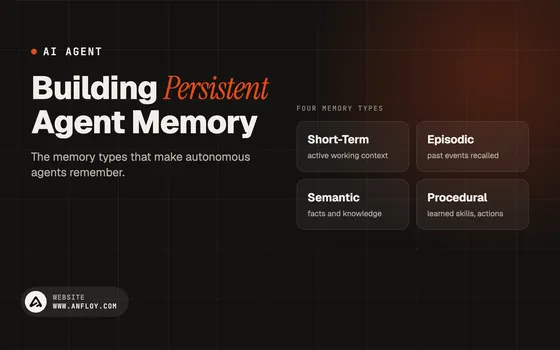
Step 4: Add memory
Production agents need memory.
Without memory, every interaction becomes isolated.
Modern agent systems often include:
Session memory
Context within a conversation.
Workflow memory
State across operational tasks.
Persistent memory
Long-term business knowledge.
This is especially important for:
- company AI brains
- onboarding systems
- GTM agents
- customer success workflows
Memory transforms an AI tool into an operational system.
Step 5: Implement guardrails
Every production AI system needs boundaries.
Guardrails help prevent:
- hallucinations
- security issues
- workflow failures
- incorrect actions
- unauthorized access
Examples include:
- approval workflows
- role permissions
- confidence thresholds
- escalation logic
- action restrictions
The goal is not removing AI autonomy.
The goal is making it safe.
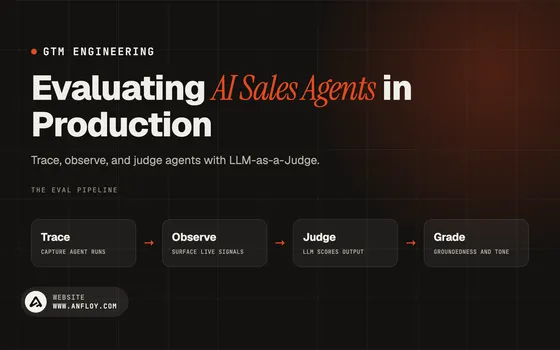
Step 6: Build monitoring and observability
One of the biggest differences between prototypes and production systems is visibility.
You need to know:
- what the agent is doing
- why decisions were made
- when failures occur
- how workflows perform
Monitoring should track:
- response quality
- execution success rates
- latency
- costs
- user satisfaction
- workflow outcomes
If you cannot observe the system, you cannot improve it.
Step 7: Start with human-in-the-loop workflows
Many companies rush toward full autonomy.
That is often a mistake.
The best production deployments begin with human oversight. For example, an AI content engine may draft outreach while humans approve final messaging.
Examples include:
- AI drafts outreach
- humans approve
- AI retrieves information
- humans validate
- AI recommends actions
- humans execute
Over time, confidence increases and automation expands.
This approach dramatically reduces risk.
What are common production architectures?
Different use cases require different architectures.
Single-agent systems
Best for:
- simple workflows
- internal assistants
- customer support
One agent handles all tasks.
Simple but limited.
Multi-agent systems
Best for:
- GTM operations
- complex workflows
- internal operations
Examples:
- research agent
- enrichment agent
- outreach agent
- CRM agent
Each agent performs a specialized function.
This creates greater scalability.
Agentic workflow systems
These systems combine:
- AI reasoning
- retrieval
- workflow execution
- operational orchestration
This is where many modern AI systems are heading.
Where companies get stuck?
Several bottlenecks repeatedly appear during deployment.
Data quality
Poor data creates poor outputs.
Workflow design
AI cannot compensate for broken processes.
Infrastructure complexity
Production systems require far more than prompts.
Security requirements
Sensitive information requires proper controls.
Lack of ownership
Many organizations depend on third-party platforms they cannot control.
Why companies choose Anfloy for production AI systems?
Companies evaluating custom AI vs AI agency models often discover ownership becomes a major factor.
Most AI vendors focus on:
- prototypes
- AI automation setups
- chatbot deployments
- consulting recommendations
Anfloy focuses on production infrastructure.
That includes:
Agentic systems
Multi-agent architectures designed for real operational execution.
GTM engines
Signal-based prospecting and outbound infrastructure.
Company AI brains
Retrieval-powered knowledge systems with persistent memory.
Internal operations systems
AI infrastructure that reduces operational overhead.
Full-stack AI products
Custom software built around company workflows.
Most importantly, clients own the infrastructure.
You own:
- code
- workflows
- integrations
- systems
- operational logic
No lock-in.
No platform dependency. Unlike approaches discussed in Zapier vs custom AI agents, clients own the underlying infrastructure.
No no-code limitations.
Build vs buy: Should you deploy internally?
For many companies, the challenge is not technology.
It is execution.
Building internally may make sense when:
- AI is core to the product
- engineering resources already exist
- long-term development is required
Working with a specialized AI engineering firm often makes sense when:
- speed matters
- operational expertise is needed
- production deployment is the priority
The right answer depends on business goals.
Conclusion
Building an AI agent is no longer the hard part.
Deploying it into production is.
The companies creating real value with AI are not simply experimenting with prompts.
They are building infrastructure that can operate reliably inside the business.
Successful production deployments require:
- retrieval systems
- memory
- guardrails
- monitoring
- integrations
- workflow orchestration
- and strong operational design
That is why the future of AI is moving beyond chatbots and simple automations.
The future belongs to production-grade AI systems that can reason, coordinate, and execute across real business operations.
At Anfloy, the focus is helping companies move beyond prototypes through:
- agentic systems
- GTM engines
- company AI brains
- internal operations infrastructure
- and full-stack AI products
Because the real competitive advantage is not building an AI demo.
It is deploying AI systems that create operational leverage every day.
Frequently asked questions
Frequently asked questions
What does deploying an AI agent into production mean?
It means making an AI system available for real business use where employees, customers, or operational workflows depend on its outputs.
Why do most AI agents fail in production?
Common reasons include poor data access, weak monitoring, lack of guardrails, workflow complexity, and infrastructure limitations.
Do AI agents need memory?
Yes. Memory improves context, consistency, workflow coordination, and long-term performance.
What infrastructure is needed for production AI agents?
Typical requirements include retrieval systems, vector databases, APIs, monitoring, permissions, and workflow orchestration.
Should companies use multi-agent systems?
For complex workflows, multi-agent architectures often outperform single-agent designs because they separate responsibilities across specialized agents.
Let's build
what your
company needs.
Drop your email. We'll send The Custom Agent Blueprint on what we'd build first for a company like yours, before you ever take a meeting.