
LinkedIn Content Machine: The Full Claude Code Setup (2026)
The full setup behind 1M+ LinkedIn impressions in 90 days: pillars, a voice that learns, Apify scraping, AI Ark and Claude qualification, Slack cards and the Slack agent, with prompts and code.
On this page
- The stack, and what each piece does
- How the system works
- The 3 pillars and the weekly plan
- The content brain: the folders
- Training the voice: your posts first
- Scrape the people you want to sound like
- Log every edit as a rule
- Log the numbers with Apify, not by hand
- The agents behind the content machine
- Finding what is landing: scraping with Apify
- Visuals from the terminal
- Pipeline: every engager checked against the ICP
- Using AI Ark to check the company
- Qualification: free rules first, then Claude
- Slack: the card
- How to build the Slack agent
- The CRM: a stricter bar than Slack
- What it costs
- How to build it: the order
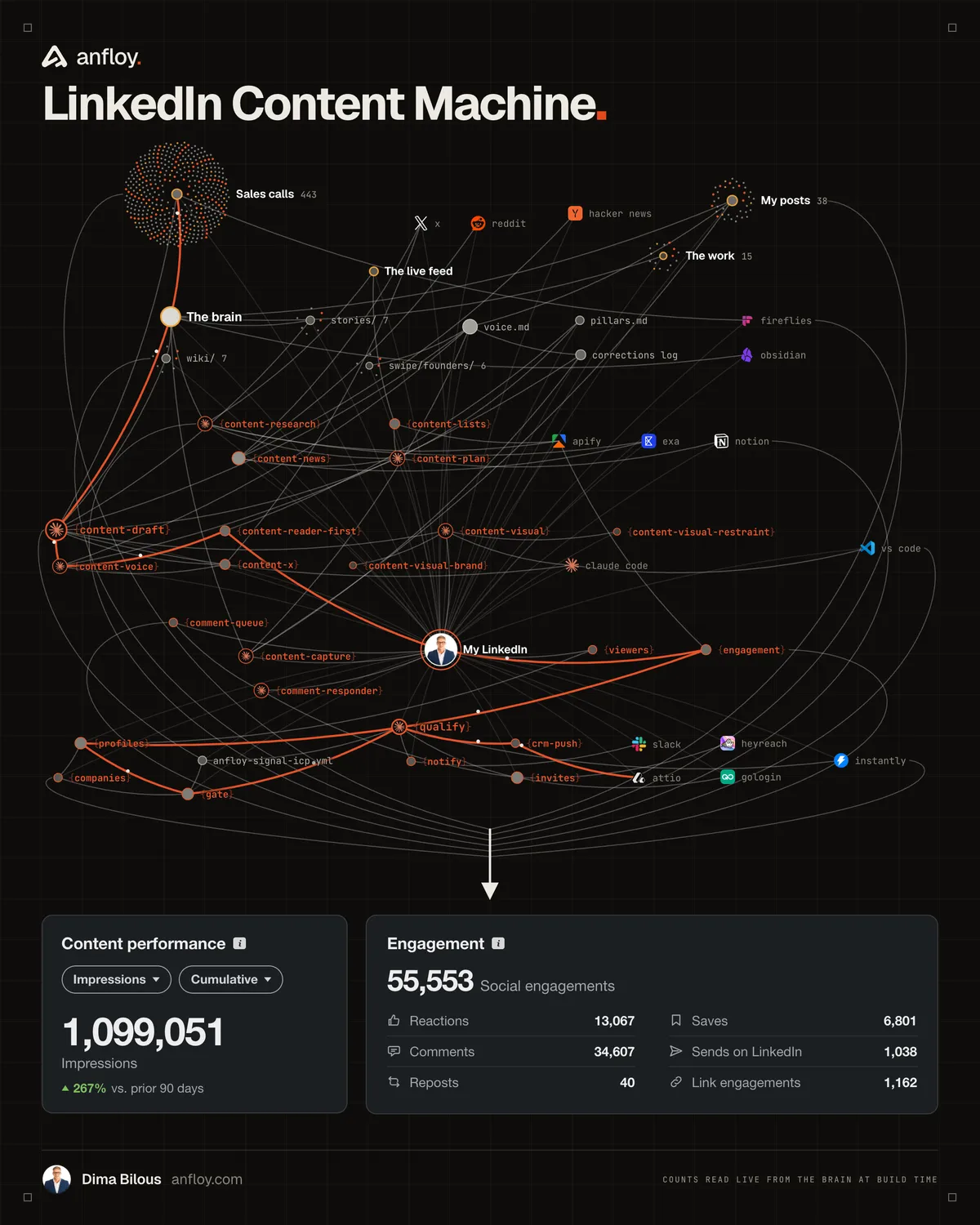
LinkedIn is our number one pipeline channel. In the last 90 days the account did 1,099,051 impressions and 55,553 social engagements on five posts a week, and the whole thing runs from a terminal in Claude Code.
It is two systems that share one repo. The first half writes: it plans the week, drafts from our own sales calls, makes the visual and learns from every post that goes out. The second half sells: it pulls every like, comment and profile view, checks each person against one ICP file, and puts the qualified ones in Slack and the CRM. Below is the full setup: the pillars, the folders, how the voice gets trained on our posts and on the founders we study, the script that scrapes every post's numbers back in, each agent, how the visuals are built, the Apify calls, the AI Ark check, the qualification prompt, the Slack card, how to build the Slack agent, what it costs, what broke, and the build order.
The stack, and what each piece does
- Claude Code. Runs everything. Every agent below is a skill: a folder with one instruction file that Claude Code loads when the task matches.
- A markdown brain. One folder in the repo with the voice file, every post we have published, our sales call transcripts, the pillars and the calendar. Obsidian reads it; Claude Code searches it.
- Fireflies. Records the sales calls. The transcripts are the raw material for most posts.
- Apify. Scrapes LinkedIn without touching our own account: top posts in the niche, our own posts, and everyone who reacted or commented.
- AI Ark. Company headcount and firmographics for each engager, plus email finding on the cold email side.
- Claude. Sonnet for the qualification verdict and the Slack agent, Haiku for high-volume scoring.
- Slack. One channel where qualified people show up as cards. One bot that updates the CRM when you mention it.
- Attio. The CRM. A qualified person who commented becomes a deal at the first stage.
- Supabase. The ledger: every person scored, every signal, so nobody gets scored or contacted twice.
- Railway. Runs the scheduled part. The only thing left on a laptop is the profile-viewer pull, because that needs our own logged-in session.
How the system works
- One brain, two halves. Content reads the brain to write. Pipeline reads the same ICP file to qualify. Neither has its own copy of anything.
- Nothing gets written from general knowledge. A draft can only use what is in the brain: a call, a build, a number we recorded. If it is not there, it does not go in the post.
- Every post trains the next one. The published text is saved word for word, a script scrapes its real numbers back in, and every edit we make to a draft is saved as a rule.
- Free rules first, the model second. Cheap string checks throw out most people before any paid enrichment or model call.
- People decide, agents prepare. The agent qualifies, enriches and writes the card. A person sends every LinkedIn message.
The 3 pillars and the weekly plan
Pick three topics and post only inside them. LinkedIn ranks by interest now, so the account gets shown to people based on what it has posted before. Post outside the pillars and the algorithm stops knowing who to put you in front of.
Ours:
- The work we build. Real systems, what they cost, how they were built, what went wrong.
- The personal journey. Moving countries, starting over, building the company.
- Industry insights and proven frameworks. Things we tested ourselves, with the numbers.
The week:
- Monday and Wednesday. A real, proven framework. One of these is the weekly lead magnet.
- Tuesday. A personal post.
- Thursday and Friday. One screenshot from the day, one controversial opinion.
The rules that hold it together:
- Five posts a week, and more only if the quality holds. Three good posts beat seven average ones. The moment a post goes out just to fill a slot, drop a day.
- Reply to every comment in the first 90 minutes. That window decides most of the reach.
- Write for saves. A save is worth roughly five likes and two comments in the public 2026 studies of LinkedIn reach. Write the post someone wants to keep.
- One lead magnet a week at most. Only when the asset is something the buyer would pay for.
- The asset goes by DM. Links in the post and in the first comment both cut reach.
- One block. Three hours on Sunday produces the five or six posts for the week.
The Sunday block, in the order we run it. Each line is one prompt or one command:
1. sync the numbers       python3 voice/sync_performance.py --yes --write --report
2. pull the week's news   "get today's news"
3. find the angles        "what should I post about this week"
4. fill the five slots    "plan next week"
5. draft, slot by slot    "write Monday's post"
6. edit by hand, then     "I edited the draft, log my changes as rules"
7. build the visual       "make the visual for Monday's post"
8. after each one is out  "save this as what I posted"
Step 1 comes first on purpose. The plan for next week is made by a system that just read how last week did.
The content brain: the folders
The brain is plain markdown in the repo. No database, no app. This is the layout:
content/
  pillars.md          the three pillars, the audience, the one story everything ladders to
  strategy.md         the rules: what works on the feed this year, hooks, formats, what is dead
  calendar.md         the fixed week and one table per week (idea -> drafting -> ready -> posted)
  voice/
    voice.md          how you write: rules, banned phrases, hooks, and the corrections log
    examples/         every post you published, word for word, one file each
  topics/backlog.md   candidate ideas, each tagged with a pillar and a source
  stories/            your own material: origin, mistakes, beliefs, things that happened
  news/               dated digests of what moved in your niche
  swipe/founders/     teardowns of 5-6 people whose posts you study (technique, not words)
  visuals/            the generators: HTML and CSS rendered to PNG, MP4 and GIF
raw/calls/            sales call transcripts
projects/             one file per thing you built
Start with a CLAUDE.md at the root. Every Claude Code session reads it first, so every prompt after that can be one line:
# {COMPANY} content machine

## What it is         (one paragraph: who posts, for which buyer, toward which outcome)
## The pillars        (the three, one line each, and what does NOT belong)
## The week           (the five slots and what goes in each)
## Hard rules         (ground only in this repo; one point per post; no fabricated numbers;
                       anonymize prospects; never post outside the pillars)
## Where things live  (one line per folder above)
## The loop           (posted -> save verbatim -> log numbers -> log every edit as a rule)
## Not built yet      (so the agent does not claim it)
Training the voice: your posts first
This is the part most people skip, and it is why their drafts sound like a machine. You have to train it. It is bad on day one.
- Paste in 10 to 20 of your real posts, word for word. One file each in the examples folder. Do not clean them up. The typos and the odd phrasing are the signal.
- Better: scrape them. The profile-posts call below returns every post you published with the exact text, so nothing is retyped and nothing gets tidied on the way in.
- Let Claude distill voice.md from them. Not adjectives like "direct and punchy". Quote your own lines as evidence for every rule.
- Draft nothing until that file has at least 10 real posts behind it.
The useful version of voice.md has two layers, and most people only write the first:
- How you think. The order your mind moves in. Ours came out as eight moves, each with real lines quoted: start from a thing you did, undersell it in line two, answer the obvious objection in a bracket, state your rule as your own, put the tool and the number first, admit the ugly part, back it with one outside fact, leave it open.
- How you sound. The spoken habits. A reaction before the explanation. Trailing dots where you would pause. One or two words in capitals for stress. Grammar that follows speech.
The prompt that produces it:
Read every file in voice/examples/. Do not describe my style in adjectives.
1. List the moves I make in the order I make them. For each move, quote two of my real lines.
2. List my spoken habits: fillers, punctuation, capitals, how I open, how I stop. Quote the lines.
3. List what I do NOT do that a typical LinkedIn post does.
4. Write three tests a draft has to pass to sound like me.
Only use lines that are in the files. If you cannot quote it, leave it out.
Then one rule that keeps it from turning into a formula: two or three habits per post, rotated against the last few posts. A draft stuffed with every habit at once reads as a parody.
Scrape the people you want to sound like
Your own posts tell the system how you write. They do not tell it what works. For that, pick three to five people in your industry whose posts sound like a real person and who look legitimate to your buyers, and scrape them too.
Same actor, their profile URL, last 30 to 60 posts. About 10 cents each. Then one teardown file per person. Ours follow the same nine sections every time:
swipe/founders/<name>.md
1. Context and earned authority     who they are, what they have earned the right to say
2. Positioning                      the lane they own, the enemy they set up
3. How they talk                    register, vocabulary, rhythm, punctuation habits (quoted)
4. How they think                   the lens they bring to every topic
5. How they frame                   the devices they reuse, each one named
6. How they format                  skeletons, hooks, line breaks, length by type, closers
7. The strategy underneath          what each kind of post is for: reach, saves, DMs, trust
8. Best posts, verbatim             6 to 8, each with: the move, the framing, why it worked
9. What to adapt and what is theirs
The step that makes this more than a swipe file is the comparison. Do not ask what their best post was. Ask what their median post was, by type, and where the gap is.
by_type = {}
for p in posts:                                  # after tagging each post with a type
    by_type.setdefault(p["type"], []).append(p["likes"])
for kind, likes in sorted(by_type.items(), key=lambda kv: -statistics.median(kv[1])):
    print(f"{kind:<28}{len(likes):>4} posts   median {statistics.median(likes):>5.0f}   best {max(likes)}")
What that told us, from three profiles scraped the same afternoon:
- A SaaS founder in our space, 56 posts in 90 days. Breakdowns of his own system had a median of 124 likes and held four of his five biggest posts. News takes sat at 86. A plain "these two models are out" post got 27. The same week, the same news written as "here is what I run on it now" got 602. The trend only worked when it was attached to his own setup and a number.
- Four of his five biggest posts were diagrams that draw themselves. Not static images. A dense board that builds stage by stage. We had been posting stills.
- A bootstrapped founder with a large following, 30 posts. His typed-as-spoken posts did 277 to 611 likes. His clean, templated promo posts did 74 to 125. Same account, same month. The polished ones are the bottom of his feed.
- Our own account, 45 posts. The posts written in smooth analyst prose sat in the middle or bottom of our numbers and carried almost none of our own habits.
That last comparison became a rule in voice.md: if a draft got smoother in editing, it got worse.
Then the part that keeps you from becoming a copy. Each move you want gets one row: the move, their line as evidence only, and how it already shows up in your own writing. And a list of what you will not take:
move:      admit the fear, then the blunt outcome, in two beats
evidence:  (their line, quoted, never reused)
for me:    I already do this smaller. Let the admission be its own short line.

do not adopt: their slang, their profanity, their biography, their numbers, their prediction hooks
Borrow the intention of the move. Write it in your words. A founder who is 22 and one who has bootstrapped for 12 years both sound right as themselves and wrong as each other.
Log every edit as a rule
When you change a draft, the change goes into a corrections log at the bottom of voice.md in three parts: what was off, what you changed it to, and the rule it implies. Ours has 21 entries. Three of them, to show how specific they get:
- Never open on what something cost you. The draft hooked on the price of a course. The edit moved the price to line two and turned it into the reason the post is free.
- The recap line gets cut. Twice the sentence that summarized what the reader had just read was deleted. Go from the list straight to the consequence.
- The slightly odd word is the right word. On a joke post the edit kept an awkward phrase over the obvious one, because the obvious one is the joke everyone posts.
I edited the draft. Compare my version to yours line by line, list what I changed,
and add each change to the corrections log as: what was off, what I changed it to, the rule.
Do not defend your version.
Log the numbers with Apify, not by hand
"Save how each post did" is advice nobody follows. We wrote it into our own process in July. In October, 28 of our 38 saved posts still said performance unknown. So it is a script now. It scrapes the profile, matches each live post to its file by the opening words, and rewrites one line.
ACTOR = "harvestapi~linkedin-profile-posts"

def norm(s):                                      # letters and digits only, so curly quotes and emoji never break a match
    return re.sub(r"\W+", "", s.lower())

posts = run_actor(ACTOR, {"targetUrls": [PROFILE], "maxPosts": 100, "postedLimit": "3months",
                          "includeReposts": False, "includeQuotePosts": False})
rows = [{"key": norm(p["content"]),
         "likes": p["engagement"].get("likes") or 0,
         "comments": p["engagement"].get("comments") or 0,
         "shares": p["engagement"].get("shares") or 0} for p in posts]

like_lo, _, like_hi = statistics.quantiles([r["likes"] for r in rows], n=4)
com_lo, _, com_hi = statistics.quantiles([r["comments"] for r in rows], n=4)

def label(r):                                     # relative to YOUR account, never an absolute number
    if r["likes"] >= like_hi or r["comments"] >= com_hi:
        return "top"
    return "low" if r["likes"] <= like_lo and r["comments"] <= com_lo else "mid"

for f in sorted(EXAMPLES.glob("[0-9]*.md")):
    text = f.read_text()
    hit = next((r for r in rows if r["key"][:48] in norm(text)), None)
    if not hit:
        continue
    line = (f"performance: {label(hit)} ({hit['likes']} likes, {hit['comments']} comments, "
            f"{hit['shares']} shares as of {date.today()})")
    f.write_text(re.sub(r"(?m)^performance:.*$", line, text, count=1))   # only this line, the post text is never touched
Three decisions in there that matter:
- Top means top for this account. Upper quartile on likes or on comments. A comment-gated post with 64 likes and 218 comments is a top post, and a likes-only rule files it as average.
- It prints the gap. Every post that is live on LinkedIn with no file in the folder, best first. Ours listed 21, including one with 761 comments that had been saved from the draft and not from what went out.
- It prices the run first. 100 posts is about 20 cents, and nothing runs until that is approved.
Each example file ends up like this:
---
pillar: the-work
type: lead magnet
performance: top (469 likes, 857 comments, 21 shares as of 2026-10-05)
posted: 2026-09-14
---
# then the post, exactly as it went out, and one line on why it worked
Once the numbers are in, the same script answers the question that plans the week. Median by kind of post, from our own account:
- Lead magnets. 68 likes, 157 comments.
- Personal posts. 117 likes, 43 comments.
- Lists and inventories. 79 likes, 39 comments.
- News and trend takes. 78 likes, 24 comments.
- Opinion posts. 48 likes, 36 comments.
- Sponsored. 25 likes, 7 comments.
Likes and comments rank the formats in opposite order. Personal posts win likes. Lead magnets win comments by a factor of three or four, and comments are where the pipeline is, because every commenter gets checked against the ICP. If we planned the week on likes we would post personal stories five days a week and book nothing. The sample is small, one to seven posts per kind, so it sets direction and not a law.
Two more things the same data showed when we tagged all 45 posts by hand:
- Tactical how-to posts had a median of 38 likes. Opinion essays with no system or number attached, 28. Fourteen of 45 posts sat in those two groups.
- We published the same list twice. The first version got 39 likes. The second, with different opening lines and a comment keyword, got 251 likes and 761 comments. Same content. Both versions are in the folder with their numbers, so the drafting agent sees which opening worked.
The agents behind the content machine
Each of these is a skill. It reads specific files and writes specific files, which is what makes them easy to fix.
- Research. Reads the news digests, the sales calls and the builds, then appends candidate ideas to the backlog, each tagged with a pillar and the source it came from.
- News. Writes one dated digest of what moved in the niche: what happened, then the angles worth posting. Sources are LinkedIn, X, Reddit and Hacker News.
- Plan. Reads the strategy, the pillars and the backlog and fills the five slots for the week. It only plans.
- Draft. Writes one to three options for a slot. It searches the brain two or three ways first, and under each option it lists the call or build the post came from so we can check it.
- Voice. The reference every draft is checked against: the rules, the banned phrases, the examples.
- Reader first. One pass that keeps what we actually run and cuts anything that reads as a pitch.
- Visual. Builds the graphic from the terminal.
- Capture. After a post goes out: saves it verbatim, logs the numbers, logs the edits as rules, marks the slot posted.
A skill is a folder with one markdown file. No code. This is the drafting skill, shortened:
---
name: content-draft
description: Write a LinkedIn post in the founder's voice, grounded only in our own material.
  Trigger: "write a post about X", "draft a LinkedIn post", "post idea for [pillar]".
---
# content-draft
1. Load the voice and the strategy. Read voice.md and strategy.md. Non-negotiable.
2. Ground it in the brain. Search the calls and the builds two or three ways.
   If the angle has no grounding in our material, say so and ask for the real detail. Do not invent it.
3. Choose the format. Vary it across the options you return.
4. Write 1 to 3 options. A real hook from a real observation, then the point, then a real question.
5. Under each option add "Grounded in:" naming the call or build it came from.
6. Self-check. Could a generic account have posted this? If yes, rewrite it or drop it.
The description is what Claude Code matches against what you type, so the triggers are written as the phrases you actually say. Step 2 is the one that matters. It runs a search over the brain before a word is written:
brain-search index                                            # after anything new is added
brain-search search "what do buyers say when they push back on price" -k 8
That search is hybrid: keyword matching plus local embeddings, fused half and half, over every call, build and post. It runs on the laptop and costs nothing. The keyword half finds the exact phrase a buyer used. The embedding half finds the call where they said it differently.
A draft prompt is one line once the brain exists:
write Wednesday's post: the framework slot, on what we changed in our cold email
qualification after the September calls
Finding what is landing: scraping with Apify
We do not guess topics. We look at what already worked for the people our buyers follow, then write our own version from our own material.
Two actors do most of it. One searches posts by keyword. The other pulls every post from a profile, which is how we study a specific founder and how we pull our own posts to log the numbers.
# every post from one profile in the last 3 months, with likes, comments and shares
curl -s -X POST "https://api.apify.com/v2/acts/harvestapi~linkedin-profile-posts/runs?token=$APIFY_API_TOKEN" \
  -H "Content-Type: application/json" \
  -d '{
    "targetUrls": ["https://www.linkedin.com/in/<handle>/"],
    "maxPosts": 100,
    "postedLimit": "3months",
    "includeReposts": false,
    "includeQuotePosts": false
  }'
The run is asynchronous. Start it, poll the run until it succeeds, then read the dataset. Two rules we learned the hard way:
- Raise on a failed run. An empty list from a crashed actor looks exactly like a real empty result. Ours throws.
- Check which token works. We had two token names holding different keys, one of them dead, and every call returned 401 while the code looked fine.
Then rank what comes back. We score a post as likes plus comments plus shares, sort, and read the top 20 by hand:
def score(post):
    e = post.get("engagement") or {}
    return (e.get("likes") or 0) + (e.get("comments") or 0) + (e.get("shares") or 0)

top = sorted(posts, key=score, reverse=True)[:20]
for p in top:
    print(score(p), p["postedAt"]["date"][:10], p["content"].split("\n")[0][:90])
This is the honest version of trend scoring. It ranks by engagement, not by who engaged. Checking the engagers against the ICP happens later, on our own posts, where it pays for itself.
What to look for in the top 20: the first two lines, the format (list, story, breakdown), the length, and whether there is a visual. Trends show up on X before LinkedIn, so the news agent checks there first. Cost is about $0.002 a post, so studying a founder's last 100 posts is around 20 cents.
Visuals from the terminal
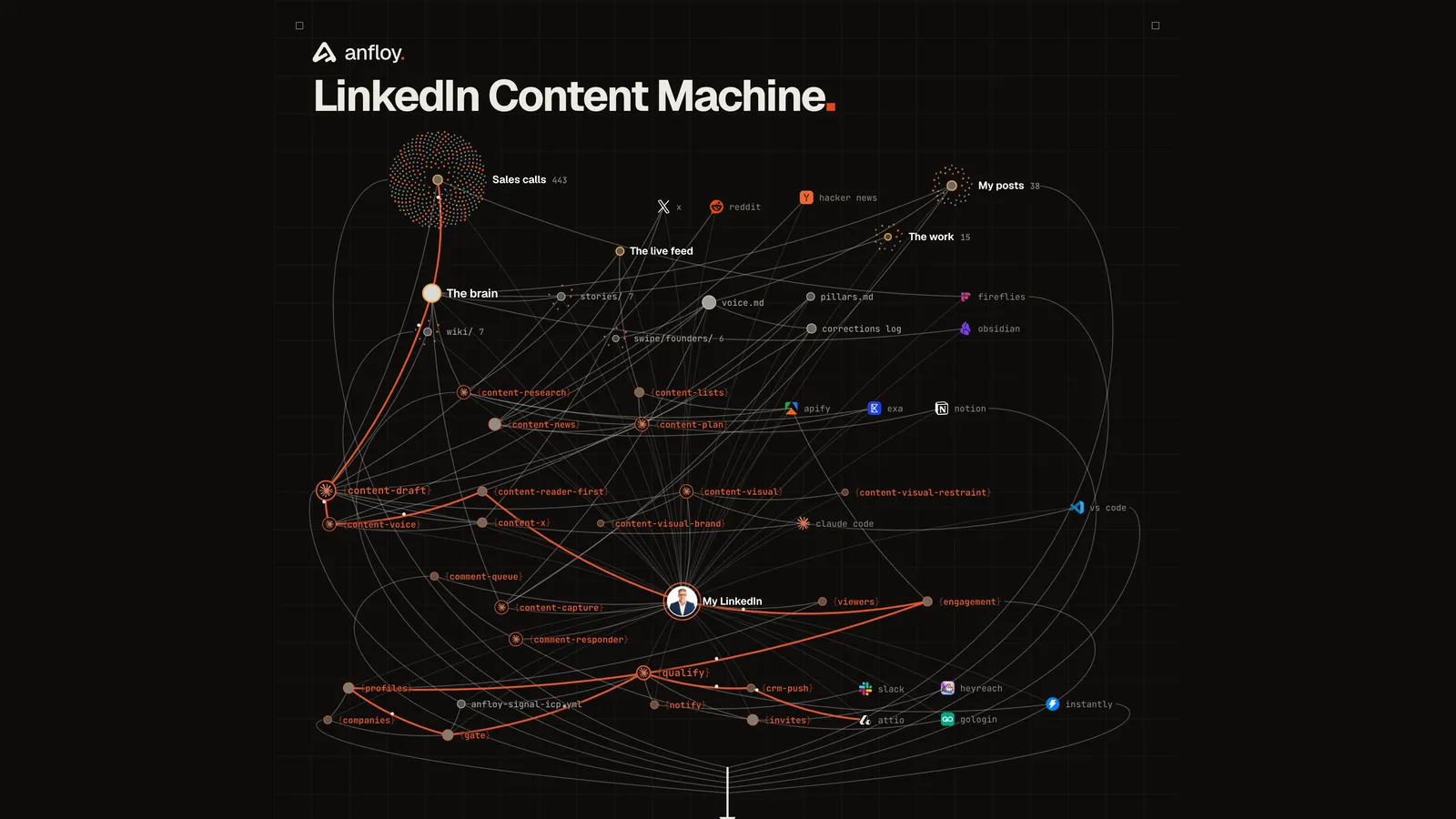
Every graphic is a script Claude Code writes: data in, HTML and CSS out, rendered by a headless browser. No design tool, no template site. The diagram at the top of this page is one of them.
A generator has four parts:
- The content as data. Every node is a line in an object, every connection a pair. Changing the diagram is editing a list.
- The layout as code. Positions come from a seeded force pass, so the picture never shifts between renders and nothing is dragged by hand.
- A clock. Every element carries the second it appears. One function sets the whole page to time t.
- Checks. The script measures the rendered page and fails if two labels overlap or anything leaves the frame.
The clock is what makes animation cheap. The page is loaded once and never rebuilt:
window.setT = (t) => {
  const ease = (p) => 1 - Math.pow(1 - Math.max(0, Math.min(1, p)), 3);
  document.querySelectorAll("[data-at]").forEach((el) => {        // every element knows when it appears
    el.style.opacity = ease((t - Number(el.dataset.at)) / 0.4);
  });
  document.querySelectorAll(".draw").forEach((path) => {          // lines draw themselves (pathLength = 1)
    path.style.strokeDasharray = "1 1";
    path.style.strokeDashoffset = 1 - ease((t - Number(path.dataset.at)) / 0.55);
  });
};await page.setViewport({ width: 1080, height: 1350, deviceScaleFactor: 2 }); // 2160 x 2700 out
await page.setContent(html, { waitUntil: "load" });
await page.evaluate(() => document.fonts.ready);
for (let i = 0; i < frames; i++) {
await page.evaluate((t) => window.setT(t), START + (i * SPEED) / FPS);
await page.screenshot({ path: `frames/f_${String(i).padStart(3, "0")}.png` });
}Then ffmpeg. The MP4 is the one to post. The GIF is cut from the same frames with a two-pass palette and no dithering, because dithering lays visible noise across a flat dark background:
ffmpeg -framerate 30 -i frames/f_%03d.png -c:v libx264 -preset slow -pix_fmt yuv420p -crf 12 -movflags +faststart out.mp4
ffmpeg -framerate 30 -i frames/f_%03d.png -vf "fps=20,scale=1080:-1:flags=lanczos,palettegen=max_colors=256:stats_mode=diff" palette.png
ffmpeg -framerate 30 -i frames/f_%03d.png -i palette.png \
  -lavfi "[0:v]fps=20,scale=1080:-1:flags=lanczos[s];[s][1:v]paletteuse=dither=none:diff_mode=rectangle" -loop 0 out.gif
And the check that stops a broken render from being posted:
const problems = await page.evaluate(() => {
  const bad = [], labels = [...document.querySelectorAll(".lb")].map((e) => e.getBoundingClientRect());
  const hit = (a, b) => a.left < b.right && b.left < a.right && a.top < b.bottom && b.top < a.bottom;
  labels.forEach((a, i) => {
    if (a.left < 14 || a.right > innerWidth - 14) bad.push("a label leaves the frame");
    labels.slice(i + 1).forEach((b) => { if (hit(a, b)) bad.push("two labels overlap"); });
  });
  return bad;
});
if (problems.length) { console.error(problems); process.exitCode = 2; }
Numbers on the canvas are read off disk when the script runs. The cluster of dots labeled 443 sales calls is 443 dots, because the script counted the files. Nothing on a poster is typed in.
The diagram on this page took several versions in one afternoon, and the rejections are more useful than the result:
- A board of cards with written bullets. Rejected. A poster is logos, real names, counts and connectors. A sentence belongs in the post.
- A tall, thin layout. Rejected. It read as a strip in the feed. The frame is 4 by 5.
- A colorful version with glows, six colors by stage. Rejected as childish. The one that worked is near-monochrome with a single accent color, and all other color comes from real logos.
- A big profile photo in the middle. Rejected. Small, so the picture reads as zoomed out and dense.
- An animation that opens on an empty frame. Rejected. It opens partly drawn and fills in, so the first frame in the feed already looks like something.
- Twenty-five nodes. Too few to look like a system. The final has 51 nodes and 75 connections, each one a real file or tool.
Small things that cost real time:
- Fonts inlined as base64. Loading them from the network added about 70 seconds to every render.
- Render through Puppeteer, one browser for every frame. The command-line screenshot route left dozens of stuck browser processes behind.
- Measure the encoded file, not the source. Blur only shows up after the scale and the palette pass. We crop the finished MP4 and look at it.
- A GIF that plays slowly in one viewer is usually the viewer. Decoding all eight seconds of ours takes a quarter of a second. Check the file's real duration before re-encoding anything.
node linkedin-graph.mjs            # the still, 2160 x 2700
node linkedin-graph.mjs --video    # plus a 30 fps MP4 and a 1080-wide GIF
Pipeline: every engager checked against the ICP
This is the half that pays for the rest. A post is done when the people who engaged with it have been looked at.
The chain, in order:
- Sweep the posts. For each recent post, pull who reacted and who commented.
- Add profile viewers. Pulled from our own analytics page on a laptop, then sent to the server.
- Enrich the person. Role, employer, followers, country.
- Enrich the company. Headcount, from AI Ark.
- Qualify. Free rules, then Claude.
- Post to Slack. Tier 1 and tier 2 only.
- Write the CRM. A stricter bar than Slack.
The two Apify actors for engagers take the post URL:
{
  "posts": ["https://www.linkedin.com/posts/<post-url>"],
  "maxItems": 200,
  "profileScraperMode": "main"
}
One call goes to the reactions actor (harvestapi/linkedin-post-reactions) and one to the comments actor (harvestapi/linkedin-post-comments). Each row comes back with the person's public profile handle, name, headline, follower count, current role and company, the company's LinkedIn URL and the country. What matters in practice:
- Use main mode. The short mode returns an opaque profile ID, and no enrichment provider can resolve it. Main mode costs about $4 per 1,000 engagers and returns the real profile.
- Reactions have no date filter. Every re-sweep of a post buys every reaction again. So we store each post's like and comment counts, and an actor runs only when its count moved.
- Price every call before making it. Items times $0.004, against a budget per run. Ours is $2. A post that does not fit waits for the next pass.
- Comments can be filtered by date. Re-sweeps of comments ask only for the last 24 hours or week.
Our posts average 124 engagers, and a full sweep costs about $2.
The same chain works on other people's posts. Point it at the creators your buyers follow, pull the engagers of their recent posts, and send the qualified ones to cold email. One full run across ten creators bought 18,914 engagers for $75.66 and ended with 750 verified leads, about 10 cents a lead. Free rules threw out 77 percent of what was bought, and about 60 percent of all engagers failed on geography alone.
Using AI Ark to check the company
A senior headline is not enough. We had a tier 1 card for someone with 200 followers whose company had no page, and another for a one-person company with 13 followers. The fix was to look at the company before the person gets scored.
AI Ark returns headcount for a batch of company LinkedIn URLs:
curl -s -X POST "https://api.ai-ark.com/api/developer-portal/v1/companies" \
  -H "X-TOKEN: $AIARK_API_KEY" \
  -H "User-Agent: signals/1.0" \
  -H "Content-Type: application/json" \
  -d '{
    "page": 0,
    "size": 100,
    "account": { "linkedin": { "any": { "include": [
      "https://www.linkedin.com/company/<company-a>",
      "https://www.linkedin.com/company/<company-b>"
    ] } } }
  }'
Each company comes back with a staff total, a staff range, the founding year and the industry. It costs a tenth of a credit per company returned, and we cache the answer for good, because a company's size does not change week to week.
The traps, all of which cost us time:
- Keep batches at 50. A batch of 50 URLs returned 48 matches. A batch of 75 returned one.
- Send a real User-Agent. The default one from a script gets a 403 from the firewall.
- Do not trust the HTTP status. A not-found comes back as a 200 with a 404 inside the body.
- A malformed filter is ignored, not rejected. You get a 200, an unrelated result and a charge. Test every new filter on one record first.
- Headcount undercounts very small firms. A total of 0 or 1 often sits next to a range of 2 to 10. Use the range when the two disagree.
For the cold email side, the same provider finds the email from a profile URL, and it bills only on a hit. We run a waterfall: emails we already hold, then AI Ark, then Prospeo, then Apollo, each paying only when it finds one. Everything is verified before it is sent, and only addresses marked deliverable go out.
Qualification: free rules first, then Claude
One ICP file drives every decision. The rules are data, not code, so changing who we want is an edit to a YAML file:
# the shape of the file; the lists are example values, write your own
min_followers: 1000
min_company_employees: 2
max_company_employees: 5000
min_company_followers: 200

allow_countries: [United States, Canada, United Kingdom]

seniority_examples: [founder, ceo, coo, cro, cmo, vp, head of, director, owner, partner]
exclude_titles: [student, intern, recruiter, job seeker]
exclude_role_titles: [gtm engineer, revops, sales operations]    # matched on the role only

competitor_rule: >
  Exclude companies whose core offer is the same service we sell.
  A software product in our space is a buyer. An agency in an adjacent field is a buyer.
  When unsure, keep them at tier 3.
competitor_hard_drop: ["<phrases that only a direct competitor uses>"]

exclude_companies: ["<our own company>", "<current clients>", "<former employers>"]

tiers:
  1: Runs sales, marketing, growth, ops or the whole company, at a real company. Not a competitor.
  2: Right function and a real company, but smaller or the fit is thinner.
  3: Plausible but uncertain.
The order matters more than the rules.
- Before any spend: drop the obvious ones on text alone. Disqualifying words, direct-competitor phrases, a headline in a language we do not sell in.
- After enrichment: role, excluded companies, past employers, followers under 1,000, no employer, no company page, company too small, country not on the list.
- Then Claude. Only the survivors.
- Then one last check: is this person already in our pipeline? If the system that answers that question is down, the run stops. It does not guess.
The model call is one request per 25 people, with the long instructions cached, and the answer forced into a fixed shape:
You score inbound LinkedIn signals for {COMPANY}.

GATE 1, competitor: is their company's core offer the same service we sell? yes / no / unsure
GATE 2, who we want: {the target rule from the ICP file}
GATE 3, seniority: do they run the function or the company?
Then the company: is it a real operating business with a team?

For each person return:
  slug, tier (1 | 2 | 3 | disqualified), competitor (yes | no | unsure),
  segment, company_guess, reason (one line, plain words)
Rules the code enforces on top of the model:
- A competitor verdict of yes is always disqualified. The model does not get to overrule it.
- A person the model failed to score is tier 3, and tier 3 is never shown.
- If every batch fails, the run stops. We once had a dead API key turn every verdict into a failure, and 20 unscored people were posted to Slack as if they had been checked.
- Verdicts are cached. The key is exactly what the model saw. A person whose details did not change is not scored again.
A run of 98 people cost about 6 cents of Claude against about $2 of Apify. The scraping is the bill. The judgment is nearly free.
Things that looked right and were wrong:
- Checking seniority before the title was fetched. It cut 62 percent of profile viewers for missing a title nobody had looked up yet.
- Substring matching. A founder was dropped because three letters of a junior title appeared inside another word. Every match is whole-word now.
- Matching the headline. A CEO who listed our category as a topic was dropped as a competitor. Role rules read the role only.
- A missing country counted as a pass. It is held as unknown now.
- Competitors look like perfect buyers to a rule. On the first run, 11 of 17 qualified people were peers selling the same thing.
Slack: the card
Qualified people land in one channel as cards. Tier 1 and tier 2 only. A profile view older than seven days is not posted. A person is announced at most once per signal level, so at most three times: viewed, liked, commented.
The card says who they are, what they did, how long ago, why they qualified, and has one button that opens their profile:
{
  "channel": "C0XXXXXXX",
  "text": "Jane Doe commented, Tier 1",
  "blocks": [
    {
      "type": "section",
      "text": { "type": "mrkdwn", "text": "*Jane Doe* :fire:  _Tier 1_\nCOO at Acme Logistics\nCommented on your post, 2h ago\nReply to the comment, then reach out.\nAcme Logistics · 2nd · 14 mutual\n_why: runs operations at a 120-person company, not a competitor_" },
      "accessory": { "type": "button", "text": { "type": "plain_text", "text": "Open on LinkedIn" }, "url": "https://www.linkedin.com/in/<handle>/", "action_id": "open_profile" }
    },
    {
      "type": "context",
      "elements": [ { "type": "mrkdwn", "text": "> their comment, cut to 300 characters" } ]
    }
  ]
}
That body goes to chat.postMessage with the bot token. No framework is needed to post a card. Strongest signal first: a comment beats a like, a like beats a view.
A person sends the message. Nothing in this system sends on LinkedIn. We learned that one the expensive way on an older setup: an unattended sender with no saved daily counter ran 40 to 52 invites a day, spiked to 110, and left 825 pending. If you ever automate invites, keep it under 20 a day, weekdays only, spread through the day, and store the counter on disk.
Alerts matter as much as cards. The engine was once off for a week and nobody knew, because a broken pipeline looks exactly like a quiet week. Now a watchdog posts when the viewer pull, the post sweep or the CRM hand-off has not run in a day, at most once every six hours, and posts an all-clear when it recovers.
How to build the Slack agent
Two different things live in Slack. Cards, which only need a bot token. And an agent you can talk to, which needs a small web service. Build the cards first.
Create the app from a manifest, so the setup is one paste:
display_information:
  name: Signals
features:
  bot_user:
    display_name: Signals
oauth_config:
  scopes:
    bot:
      - chat:write
      - chat:write.public
      - app_mentions:read
      - channels:history
settings:
  event_subscriptions:
    request_url: https://<your-service>/slack/events
    bot_events:
      - app_mention
  interactivity:
    is_enabled: true
    request_url: https://<your-service>/slack/interactions
Install it to the workspace, copy the bot token and the signing secret into the service's environment, and invite the bot to the channel.
The service is one FastAPI app. Three rules: verify every request, answer in under three seconds, do the work in the background.
import hashlib, hmac, json, time
from fastapi import BackgroundTasks, FastAPI, HTTPException, Request

app = FastAPI()

def verified(secret: str, timestamp: str, raw: bytes, signature: str) -> bool:
    if abs(time.time() - int(timestamp or 0)) > 300:        # replayed request
        return False
    base = b"v0:" + timestamp.encode() + b":" + raw
    expected = "v0=" + hmac.new(secret.encode(), base, hashlib.sha256).hexdigest()
    return hmac.compare_digest(expected, signature)

@app.post("/slack/events")
async def slack_events(request: Request, background: BackgroundTasks):
    raw = await request.body()
    h = request.headers
    if not verified(SIGNING_SECRET, h.get("x-slack-request-timestamp", ""), raw, h.get("x-slack-signature", "")):
        raise HTTPException(status_code=401)
    payload = json.loads(raw)
    if payload.get("type") == "url_verification":           # Slack's one-time handshake
        return {"challenge": payload["challenge"]}
    if h.get("x-slack-retry-reason") == "http_timeout":     # we already have this one
        return {"ok": True}
    background.add_task(dispatch, payload.get("event", {}))
    return {"ok": True}

@app.post("/slack/interactions")
async def slack_interactions():
    return {"ok": True}                                     # URL buttons still need an ack
Slack retries anything slower than three seconds, and a retried event turns one update into three. That is why the handler returns before the work starts.
The agent itself is a Claude tool-use loop that runs only when someone mentions the bot:
TOOLS = [
    {"name": "search_deals", "description": "Find deals by person or company name.",
     "input_schema": {"type": "object", "properties": {"query": {"type": "string"}}, "required": ["query"]}},
    {"name": "list_due", "description": "Deals whose next action is due today or overdue.",
     "input_schema": {"type": "object", "properties": {}}},
    {"name": "update_deal", "description": "Set stage, next action, its date, and add a one-line note.",
     "input_schema": {"type": "object", "properties": {
         "deal_id": {"type": "string"}, "stage": {"type": "string"},
         "next_action": {"type": "string"}, "next_action_date": {"type": "string"},
         "note": {"type": "string"}}, "required": ["deal_id"]}},
]

async def dispatch(event: dict):
    if event.get("type") != "app_mention":
        return
    text = strip_mention(event["text"])
    messages = [{"role": "user", "content": text}]
    for _ in range(6):                                      # hard cap on turns
        reply = await claude.messages.create(model=MODEL, max_tokens=800,
                                             system=SYSTEM, tools=TOOLS, messages=messages)
        if reply.stop_reason != "tool_use":
            break
        messages.append({"role": "assistant", "content": reply.content})
        messages.append({"role": "user", "content": [
            {"type": "tool_result", "tool_use_id": b.id, "content": await run_tool(b.name, b.input)}
            for b in reply.content if b.type == "tool_use"]})
    answer = "".join(b.text for b in reply.content if b.type == "text")
    await slack.chat_postMessage(channel=event["channel"], thread_ts=event["ts"], text=answer)
The system prompt is short and specific:
You update the CRM for the sales team. You can read any deal and change stage, next action,
next action date and notes. You cannot delete anything.
When someone says they replied or reached out: set the stage to Contacted, the next action
to "Follow up", due in 3 business days, and add a one-line note.
Do not invent dates. Ask when a name matches more than one deal.
Now a salesperson types one line in Slack and the CRM is updated:
@Signals followed up with Jane at Acme, next touch FridayTwo lessons from running it:
- Mentions only. The first version answered every message in the channel. Each one started up to six model turns with write access to the CRM. It only reacts to a mention now.
- One morning digest. At 7:05 on weekdays the service posts everything overdue and everything due today in one message. Before posting, it checks the channel history for today's digest, so a restart does not post it twice.
The CRM: a stricter bar than Slack
A card is cheap. A deal is not, because a deal creates follow-up work. So the CRM has its own gate after Slack.
- The ICP rules run again on the server. The hub does not trust the engine's answer blindly.
- The competitor verdict must be exactly no. Unsure does not pass.
- Tier 1 or 2.
- Signal strength of 3 or more. A comment counts 3, a like counts 2, a view counts 0. So a comment qualifies, two likes qualify, a view does not. We raised it after finding that 29 of 36 LinkedIn deals rested on a single like.
- The company must have been resolved. No headcount and no follower count means no deal.
- Not already contacted. Anyone on the blocklist, marked do-not-contact or already in an outbound campaign is skipped.
Whoever passes becomes a person and a deal at the first stage, with the next action set to reach out today and a note listing the signal, the tier, the company and their comment. One open deal per person, matched by email or by LinkedIn URL, because the same human shows up from several directions.
Of 1,401 people scored in the first weeks, 77 passed the Slack bar and 38 passed the CRM bar. That is the real shape of it: most engagement is not a buyer, and the job of the system is to show you the 3 percent.
What it costs
- Studying a niche. About $0.002 per scraped post. A founder's last 100 posts is around 20 cents.
- Your own engagers. About $0.004 per person. A full sweep of our recent posts is around $2.
- Company headcount. A tenth of an AI Ark credit per company, paid once.
- Qualification. About 6 cents of Claude for 98 people.
- Engagers of other creators. $75.66 for 18,914 people, 750 verified leads, about 10 cents each.
- Visuals. Free. They render on the laptop.
- Time. One three-hour block a week for the writing, plus replying to comments.
Set a budget per run and a cap on the Apify plan. Ten creators at full volume would be about $950 a month if nothing stopped it.
How to build it: the order
- Write the CLAUDE.md first. The template above. Without it every prompt has to explain the whole system again.
- Create the folders and scrape your own posts into them. Twenty or more, word for word. Have Claude distill voice.md from them, quoting your lines.
- Scrape three to five people you want to sound like. One teardown file each, then the comparison by type.
- Write the pillars and the week. Three pillars, five slots. Put what does not belong in writing too.
- Draft, edit, log. For the first two weeks the drafts will be wrong. Edit them and log every edit as a rule. This is the training.
I edited the draft. Compare my version to yours, list what I changed,
and add each change to the corrections log as: what was off, what I changed it to, the rule.- Add the scrape. One profile-posts call for the three people you study, one for your own account. Rank by likes plus comments plus shares. Feed the top posts to the research agent.
- Add capture and the numbers sync. After each post goes out, save it verbatim. The script fills in the numbers on Sunday.
- Write the ICP file. Start with the gates that are free: country, followers, seniority words, excluded titles, the competitor rule.
- Sweep your own posts. Reactions and comments for the last three posts. Print the people and read the list yourself before any model sees it.
- Add the company check. AI Ark in batches of 50, cached.
- Add the model, in batches of 25. Force the output shape. Cache the verdicts.
- Post cards to Slack. Bot token, chat.postMessage, tier 1 and 2 only.
- Add the CRM write with its own bar. Then the agent you can talk to, last.
- Add the watchdog before you trust it. A check that cannot fail is not a check.
This is the same pattern as the rest of our GTM agent systems: one definition of the buyer, small agents with one job each, and a person at the point where judgment matters. The CRM side is covered in full in Revenue OS, the brain in the AI company brain, and the wider roster in how we run 24 GTM agents.
Frequently asked questions
How long before the drafts sound like me?
Expect two to three weeks of editing. The first drafts are too polished and too generic. Each edit you log as a rule moves it closer, and it needs at least 10 of your real posts before it is worth drafting at all.
Do I need to be technical to set this up?
You need to be comfortable in a terminal with Claude Code. The content half is folders and markdown files. The pipeline half needs API keys for Apify and AI Ark, a Slack app and one small web service.
Is scraping engagers against LinkedIn's rules?
LinkedIn's terms restrict automated collection, so treat it as a risk decision and make it yourself. In this setup the scraping runs through Apify on public post data, away from our own account. The one thing that touches our account is reading our own profile viewers, and no step sends a message or a connection request.
Why not let the agent send the LinkedIn message?
Because the account is the asset. An unattended sender is how accounts get restricted, and a message from a founder who read the comment converts better than a template.
What does the model actually decide?
The tier and whether the company is a competitor. Country, follower count, seniority, company size and past contact are plain rules in code, checked before and after the model.
How many people from a post are real buyers?
In our first 1,401 scored people, 77 were worth a card in Slack and 38 were worth a deal in the CRM. Plan for 3 to 5 percent, and read the comments of that 3 to 5 percent yourself.
If you want this built on your stack, see how we build agentic systems, read the case studies, or book a call.
Let's build
what your
company needs.
Drop your email. We'll send The Custom Agent Blueprint on what we'd build first for a company like yours, before you ever take a meeting.