
Revenue OS: A Fully Agentic Sales Pipeline You Own (2026)
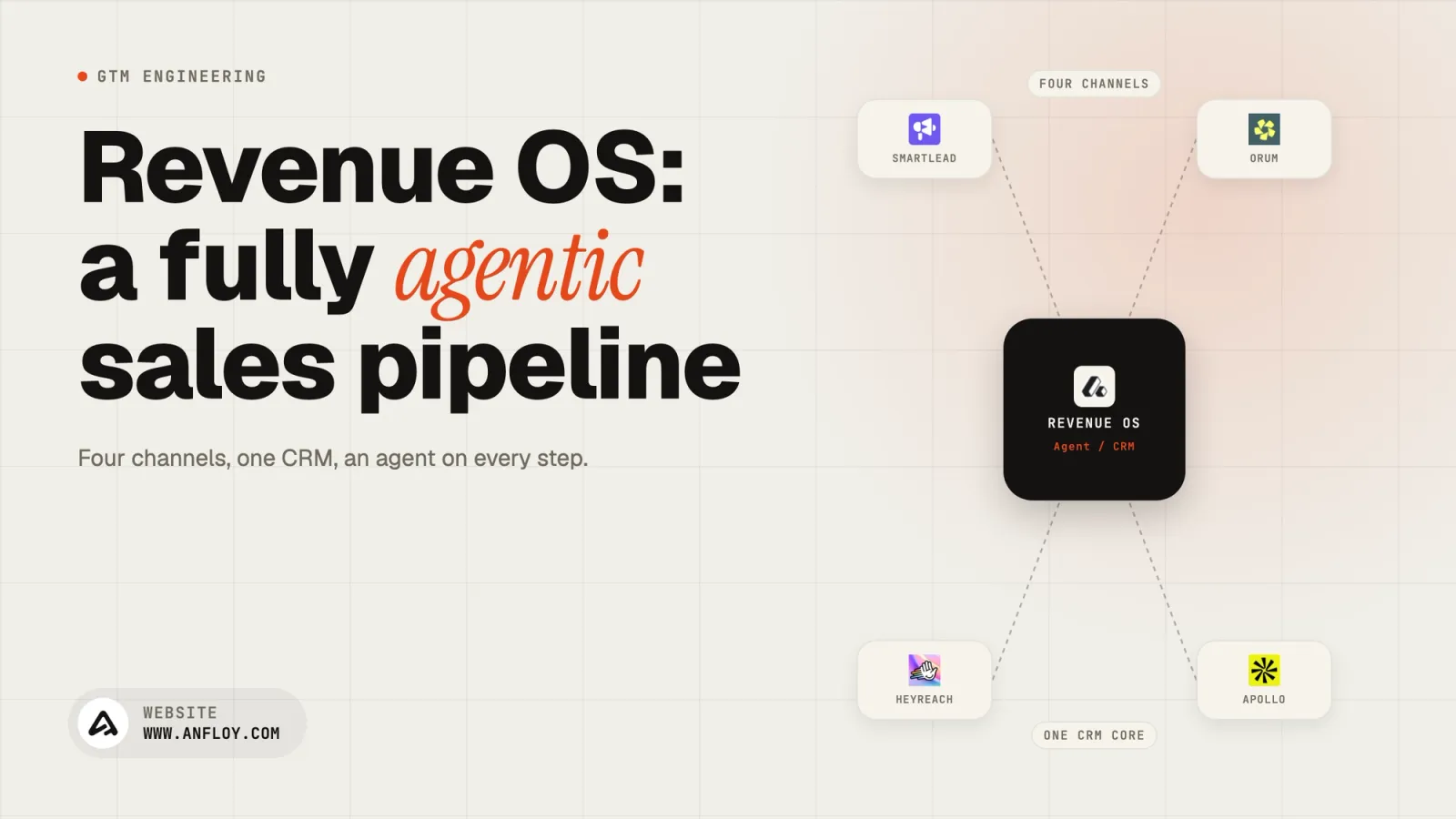
Our full Revenue OS: agents on Slack and the CRM, Supabase as the ledger, qualification before anyone gets pinged, and the setup for each channel with prompts.
On this page
- The stack, and what each piece does
- How the system works
- The backend: one hub
- The CRM: nine stages, four fields
- Slack: five channels, and who gets pinged
- Creating the Slack app and connecting it to Claude
- How Claude runs inside it
- Cold email
- Website visitors
- Inbound and calls
- The qualification agents
- The CRM hygiene agent
- The ledger: Supabase
- How to build it: the company brain first
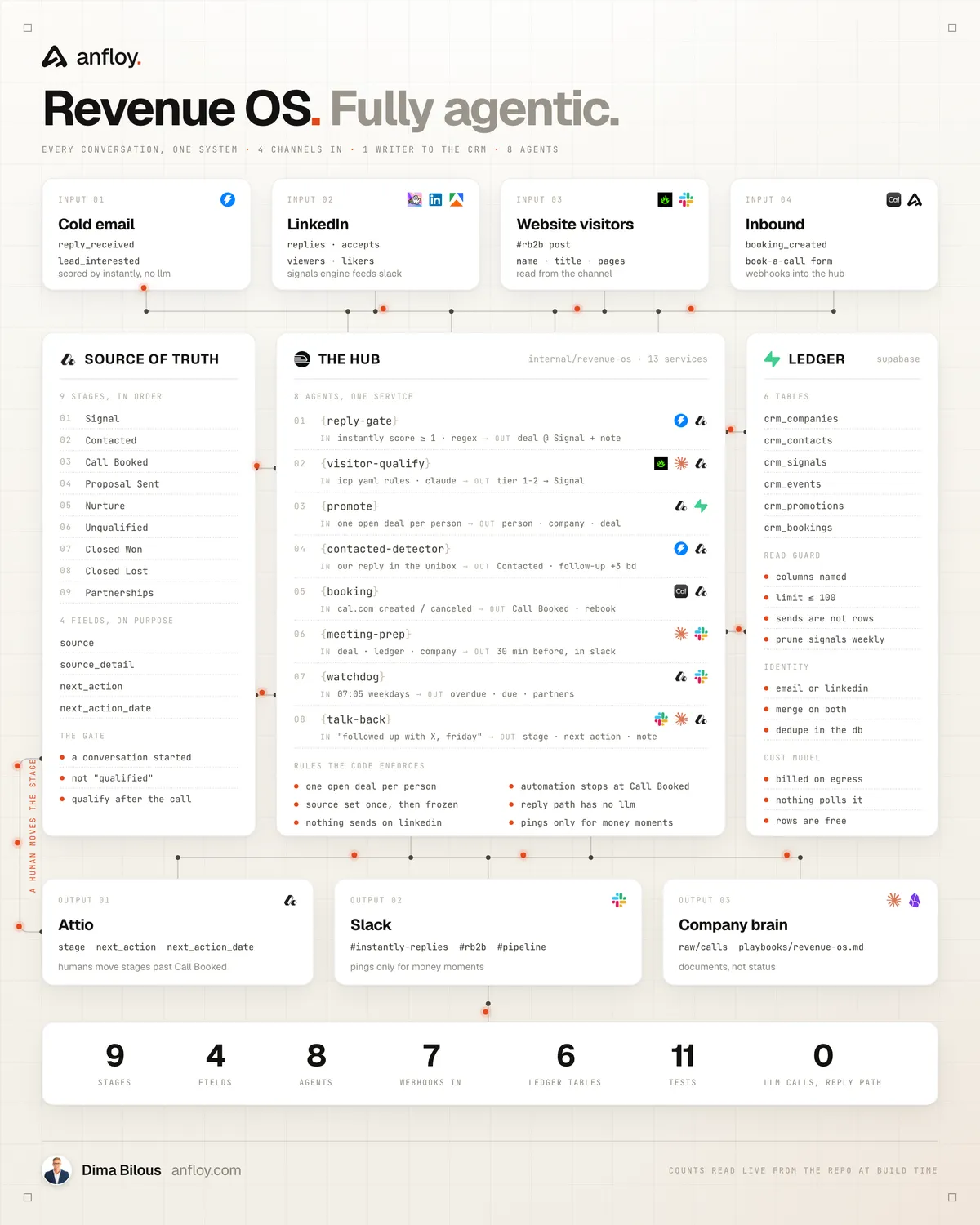
We run four acquisition channels: cold email, LinkedIn, website visitors, inbound. Every event from every channel goes into one service, and that service writes to three places: Attio for the pipeline, Supabase for the history, Slack for the people. Salespeople are pinged only when a person has passed qualification or money is involved.
The service is one FastAPI app on Railway, built with Claude Code. Below is the full setup: the stack, the backend, every agent, how qualification works, the ledger schema, how Claude runs inside it, how the Slack app is created and connected, and the build order.
The stack, and what each piece does
- Attio. The CRM. Nine stages, four deal fields. Holds what is open now.
- Supabase. The ledger. Postgres with six `crm_*` tables: every person we have enriched, signalled, emailed or met, and every reply, visit and booking tied to them. Holds everything that ever happened.
- Railway. Runs the hub: one Python 3.12 FastAPI service with webhook receivers, a Slack Events endpoint, and three background loops.
- Slack. Five channels and one bot. Humans read cards and type updates; the bot reads channels and answers in threads.
- Instantly. Cold email, about 200 mailboxes. Replies come in by webhook and by a two-minute poll of the unibox API.
- HeyReach. LinkedIn outreach. Replies and accepted invites come in by webhook.
- LinkedIn signals engine. A Node worker that pulls the founder's profile viewers, post likers and commenters.
- RB2B. Website visitor identification, posted into Slack.
- Cal.com. Bookings, cancellations and no-shows by signed webhook.
- Enrichment. Apify for LinkedIn profiles, AI Ark for company headcount and firmographics, Exa for company websites.
- Claude. Haiku for extraction, Sonnet for qualification, the meeting brief and the Slack agent.
How the system works
- Every channel runs the same chain. Receive the event, resolve the person in the ledger, enrich what is missing, qualify against one ICP file, write the ledger, write Attio through one function, post to Slack, set the next action.
- Attio holds status, Supabase holds history. Stages live only in Attio. Contacts, signals, events and promotions live only in Supabase. Neither copies the other's job.
- One writer. Nothing else in the company has an Attio API key with write access. Every deal, note and stage change goes through the hub.
- Slack is where humans decide. An agent posts a card for a qualified person or a money moment (reply, booking, closed deal). Everything else waits for the 7:05 digest.
- The CRM maintains itself. Every event and every human stage change has a trigger that sets the next action and its date.
The backend: one hub
One FastAPI app. Every integration is off until its environment variable exists, so a deploy with half the variables runs the half it can and logs the rest.
src/main.py                  FastAPI app; starts the Instantly poller, the watchdog, meeting prep
src/config.py                pydantic-settings; every key from Railway variables
src/promote.py               the only path into Attio: ledger upsert -> person -> company -> open deal -> note
src/ledger.py                Supabase PostgREST client with a read guard
src/attio/client.py          Attio v2 REST: upserts, find_open_deal, notes, value formats
src/attio/schema.py          the nine stages and four fields as code, plus the migration plan
src/services/instantly.py    poll + webhook, reply gate, quote stripper, our-reply detection
src/services/heyreach.py     LinkedIn replies and accepted invites
src/services/rb2b.py         Slack post -> extract -> qualify -> promote
src/services/gate.py         ICP rules + the Claude verdict
src/services/cal.py          bookings, cancellations, no-shows
src/services/meeting_prep.py the brief 30 minutes before a call
src/services/attio_hooks.py  human stage changes -> next actions
src/services/watchdog.py     housekeeping, blocklist sync, signal pruning, the 07:05 digest
src/services/agent.py        the Slack agent: Claude tool use over Attio and the ledger
src/routes/webhooks.py       /webhooks/instantly | cal | heyreach | website-form | attio
src/routes/slack.py          /slack/events, /slack/interactions
sql/ledger.sql               the ledger DDL, idempotent
icp/signal-icp.yml           the ICP file every agent reads
The receivers share three rules:
- Authenticate every sender. Instantly with a bearer secret we set when registering the webhook. Cal.com and Attio with an HMAC-SHA256 of the raw body. Slack with its `v0` signature and a five-minute timestamp window. HeyReach with a key in the query string. The website with a forward secret.
- Ack in under a second, work in the background. Each route verifies, hands the payload to a FastAPI background task, and returns 200. Slack retries anything slower than three seconds, and a sender that retries turns one reply into three deals.
- Never raise into the sender. Handlers catch, log and return. A failing Attio call must not make Instantly retry-storm the hub.
Three loops start with the app: the Instantly poller every 120 seconds, meeting prep every five minutes, and the watchdog that runs the morning jobs. Railway runs it with a health check on `/health`, which reports which integrations are live and whether the ledger is reachable.
The CRM: nine stages, four fields
The stages are the filters. Nothing else is needed to run the pipeline from one screen.
- Signal. A positive reply, a qualified visitor, a form or a booking. A conversation exists, nobody on our side has answered yet.
- Contacted. We replied or reached out. Follow-up in three business days, set by the agent.
- Call Booked. A Cal.com booking exists. The furthest a deal can be pushed by automation.
- Proposal Sent. After the call. Follow-up in three business days, set by the agent.
- Nurture. After the call, not now. Revisit sixty days out.
- Unqualified. After the call, not a fit.
- Closed Won / Closed Lost. Final.
- Partnerships. A separate column for friends, peers and partners.
Four fields on the deal: source (a select, set once on creation), source detail (the campaign, post or page), next action, next action date. Follow Up, Canceled and No Show are next actions with a date, and the digest surfaces them.
The schema lives in `src/attio/schema.py`, and a migration script makes the workspace match it: it renames stages, creates the fields, moves deals out of retired stages, and archives what is left. It prints the plan by default and writes only with `--apply`.
Slack: five channels, and who gets pinged
- #replies. Every positive cold-email and LinkedIn reply. Instantly's own Slack integration posts the email; the bot threads the Attio link under it.
- #signals. LinkedIn viewers, likers and commenters, tier 1 and 2 only.
- #visitors. RB2B posts every identified visitor; the bot threads its verdict under each post.
- #inbound. A booked call, a form, a cancellation, and the brief thirty minutes before each call.
- #pipeline. The 7:05 digest, and the channel where the team talks to the agent.
A human is interrupted for a qualified person or a money moment. Nothing else pings.
Creating the Slack app and connecting it to Claude
The Slack side is one app with one bot user. Every agent that reads or writes Slack uses its token. Create it from a manifest at api.slack.com/apps (Create New App, From a manifest), so the scopes, events and URLs live in the repo and are reproducible:
display_information:
  name: Revenue OS
features:
  bot_user:
    display_name: revenue-os
    always_online: true
oauth_config:
  scopes:
    bot:
      - chat:write            # post cards, digests, thread replies
      - chat:write.public     # post to channels the bot has not joined
      - channels:history      # read RB2B posts and #pipeline messages
      - channels:read
      - channels:join
      - groups:history        # the same for private channels
      - groups:read
      - reactions:read        # the pushpin override
      - reactions:write       # tick the posts it processed
      - app_mentions:read
      - users:read            # resolve who typed a command
      - im:history
      - im:write
settings:
  event_subscriptions:
    request_url: https://<hub>/slack/events
    bot_events:
      - message.channels
      - message.groups
      - app_mention
      - reaction_added
  interactivity:
    is_enabled: true
    request_url: https://<hub>/slack/interactions
  socket_mode_enabled: false
Then:
- Install the app to the workspace and copy the Bot User OAuth Token (`xoxb-...`) and the Signing Secret into Railway as `SLACK_BOT_TOKEN` and `SLACK_SIGNING_SECRET`.
- Deploy the hub before saving the event URL. Slack sends a `url_verification` challenge to `/slack/events`, and the route must echo it back.
- Invite the bot to the five channels and put each channel ID in its own variable (`SLACK_CH_REPLIES`, `SLACK_CH_VISITORS`, and so on). Routing is by channel ID, never by name.
- Change scopes through the manifest API later. With an App Configuration Token, `apps.manifest.update` changes scopes and event subscriptions from code; the only manual step left is one reinstall click.
How a Slack message reaches Claude:
@router.post("/slack/events")
async def events(request: Request, bg: BackgroundTasks):
    raw = await request.body()
    body = json.loads(raw)
    if body.get("type") == "url_verification":
        return PlainTextResponse(body["challenge"])
    if not slack.verify(request.headers["x-slack-request-timestamp"], raw,
                        request.headers["x-slack-signature"]):
        return JSONResponse({"error": "bad signature"}, status_code=401)
    if request.headers.get("x-slack-retry-num"):
        return {"ok": True}                  # already processing the first delivery
    bg.add_task(dispatch, body["event"])     # ack now, think later
    return {"ok": True}
`dispatch` routes on channel ID and event type. A message in #visitors from RB2B's bot goes to the visitor agent. A human message in #pipeline, or an @mention anywhere, goes to the Slack agent. A pushpin reaction on a visitor post forces that person into Attio. The bot ignores its own messages by comparing against its user ID from `auth.test`, which is what stops it answering itself. Whatever the agent returns is posted with `chat.postMessage` into the thread of the message that triggered it.
How Claude runs inside it
Claude runs in five places, each with one job, a fixed system prompt and a hard output shape. The Anthropic SDK is called async from the hub; the key is a Railway variable, and every call has a fallback so a model outage degrades to "held for a human", never to a lost event.
- Visitor extraction (Haiku). In: RB2B's Slack message, text plus blocks. Out: name, title, company, domain, LinkedIn URL, email, pages.
- ICP qualification (Sonnet). In: the enriched person and company. Out: tier, competitor, segment, reason.
- Meeting brief (Sonnet). In: the Attio deal, its notes, the ledger events. Out: Who, Why, three questions, Avoid, under 90 words.
- Slack agent (Sonnet). In: a message in #pipeline plus its tools. Out: tool calls, then a two-line confirmation.
- Ledger lookup (Sonnet, through the agent). In: a question about a person or a segment. Out: a timeline or a list with links.
The rules:
- Structured output on every judgement. Qualification and extraction return JSON against a schema with enums (`tier: 1|2|3|disqualified`, `competitor: yes|no|unsure`). The code never parses prose.
- Prompt caching on the long prompts. The qualification system prompt is built from the ICP file and marked `cache_control: ephemeral`, so a burst of forty visitors pays for the prompt once.
- Code checks the model. A tier is never taken at face value; the rules below override it.
- Cache verdicts on inputs. A verdict is stored with a hash of exactly what the model saw. Same inputs, no call.
- No model on the reply path. Cold-email replies are gated by Instantly's own interest score plus regex. A classifier that reads every reply is the most expensive and least reliable part of most pipelines, so there is none.
Cold email
Two inputs, one handler: Instantly's webhook, and a poll of `GET /api/v2/emails` every 120 seconds that catches anything the webhook dropped. The poller seeds its cursor from the latest email on startup so a restart does not replay the inbox.
For an inbound email (`ue_type == 2`):
- Gate. Drop machine-generated mail by subject and body regex (out of office, auto-reply, "no longer with", delivery failures). Require Instantly's `lt_interest_status >= 1`. Re-check that status 90 seconds after an "interested" webhook before trusting it; the first flag is wrong far more often than it is right. An unscored reply is held up to six hours, then posted anyway.
- Dedupe. Look up `instantly:{email_id}` in `crm_events`, then any inbound reply from the same address within ten minutes, because Instantly's webhook and its email feed carry different ids for one reply.
- Clean. Cut quoted history (`On ... wrote:`, `From:`, Outlook separators, mobile signatures) so the note in Attio is what the person actually wrote.
- Promote. Upsert the contact in the ledger with the campaign as source, attach the reply as a `crm_events` row, create or reuse the open deal at Signal, add the reply as a note, thread the Attio link under Instantly's Slack post.
For our own email (`ue_type == 3`): find the person's open deal, move Signal to Contacted, set "Follow up" three business days out, log an outbound event. Nobody types "I replied".
Before a campaign is pushed to Instantly, the lead list is checked against the ledger: blocked, do-not-contact, an open deal, a current client's domain, or contacted in the last ninety days. Those rows never reach a mailbox. Every morning the watchdog also syncs every person and company domain on an Attio deal into the Supabase `blocklist`, so a live conversation cannot be cold-emailed by a second campaign.
The signals engine is a separate Node worker with three reads. Profile viewers come from the founder's own session, because LinkedIn shows them to nobody else. Likers and commenters come per post from the last five posts, so one person on three posts is one row with `reactions: 3`. Profile visits for enrichment run through Apify, never through the founder's account.
Per person:
- Free gate first. Hard drops, named competitors, individual-contributor titles, GTM and RevOps titles. This decides who is worth paying to enrich.
- Resolve in the ledger. A person already enriched inside the freshness window reuses the stored payload and is not enriched again.
- Enrich. Apify for title, employer, followers and country; AI Ark for company headcount. A viewer has no title until this step, and gating on seniority before it drops two thirds of real buyers.
- Qualify. The rest of the rules, then Sonnet (below).
- Write. `crm_upsert_contact` by LinkedIn URL, one `crm_signals` row with a dedupe key per person and signal level.
Tier 1 and 2 are posted to #signals with the signal, the company, mutual connections, the reason, and the ledger history if the person is not new ("emailed in March, no reply, now viewing your profile"). A person is posted once per signal level, so a like after a view is one upgrade. Tier 1 gets a LinkedIn message; one emoji on the card sends the connection request, capped at ten a day. Tier 2 and 3 go to cold email. A HeyReach reply lands as a `dm_in` event and a deal at Signal with the signal history attached. Nothing sends on LinkedIn without a human.
Website visitors
RB2B has no API; it posts each identified visitor into #visitors. The bot receives the post through `message.channels`, flattens the text, attachments and blocks, and runs extraction: regex for LinkedIn URL and email first (they win when present), then one Haiku call for the rest. A masked email (`**@**`) is discarded.
Then the same path as LinkedIn: resolve, enrich the company from the domain, qualify. Every visitor is written to the ledger as a contact plus a `website_visit` signal with the pages visited and the tier, whatever the result. Tier 1 and 2 become a person, a company and a deal at Signal, source "Website visitor", with "Reach out" due today; the verdict and the Attio link are threaded under the post. Tier 3 stays in the ledger with a thread note, and a pushpin reaction promotes it. Disqualified gets its reason in the thread, which notifies nobody.
From the first run: an office manager at an accounting firm, rejected by rules without a model call; the CEO of a SaaS product company, tier 1.
Inbound and calls
The book-a-call form and the Cal.com webhook are forwarded by the website to the hub, so there is still one writer to Attio. Inbound is not gated: someone who asked for a call is a conversation, and qualification happens on the call. A form creates the deal at Signal with the answers as a note. A booking is stored in `crm_bookings`, logged as a `booked` event, and moves the open deal to Call Booked, or creates one with source "Booking link".
Meeting prep reads `crm_bookings` every five minutes for calls starting in 27 to 33 minutes that have not been prepped. For each it assembles facts: the Attio deal, stage, source and last four notes, the person and company records, and the last five ledger events with the person's own words. Those facts are posted first, then the Sonnet brief under them, then the join link. `prepped_at` is stamped so a restart does not send it twice. Canceled: back to Contacted, "Rebook the call". No-show: "Follow up on the no-show".
The qualification agents
One ICP file, every agent reads it. The Python hub and the Node signals engine load the same YAML, so the rules cannot drift between channels. The file, with placeholders:
competitor_rule: >
  EXCLUDE anyone whose company's core offer is {WHAT_YOU_SELL} for other companies.
  A company that sells a software PRODUCT is a buyer. Judge the company's core offer,
  not the person's title. When torn, keep the person at tier 3 and say why.
competitor_hard_drop: ["{competitor phrase 1}", "{competitor phrase 2}"]
target_rule: >
  {WHO_BUYS}: a senior decision maker, at a real company, in a geography you serve.
seniority_floor: "senior manager or above, or anyone who owns a budget, a team, or a P&L"
seniority_examples: [founder, ceo, coo, cro, vp sales, vp marketing, head of growth, director]
target_functions: [sales, marketing, growth, revops, operations, the whole company]
exclude_titles: [sdr, bdr, account executive, intern, student]     # individual contributors
exclude_role_titles: [gtm engineer, revops manager]                 # roles that sell what you sell
min_followers: 1000
min_company_employees: 2
allow_countries: [US, CA, GB, DE, NL, ...]
disqualify: ["looking for work", "open to work"]
exclude_companies: ["{your company}", "{live client 1}", "{live client 2}"]
tiers:
  "1": "Runs sales, marketing, growth, ops or the whole company at a real company. Reach out first."
  "2": "Right function and a real company, but smaller or the fit is thinner. Worth reaching out."
  "3": "Plausible but uncertain: company hard to place, or a competitor call we were unsure about."
  disqualified: "Competitor, excluded region, no real company, an individual contributor, or no seniority."
The rules run in this order and reject with a reason, no model call spent: hard drops, named competitors, individual-contributor titles, GTM and RevOps roles, the seniority floor, never-contact companies and domains, the follower floor, the country allowlist. Matching is whole-word regex, so "cto" does not match "director". Whoever survives goes to Sonnet with a system prompt built from the same file:
You score inbound signals for {COMPANY}, {ONE_LINE_ON_WHAT_YOU_DO}.
This person visited {SITE} or engaged with {FOUNDER} on LinkedIn.

GATE 1, COMPETITOR. This is the most important call you make.
{competitor_rule}
Set competitor to "yes", "no" or "unsure". If "yes", tier MUST be disqualified.
If "unsure", keep them at tier 3 and say why you hesitated.

GATE 2, WHO WE WANT. {target_rule} Typical examples: {target_examples}.
GATE 3, LOCATION. Allowed countries: {allow_countries}. If clearly outside, disqualify. If unknown, do not penalise.
GATE 4, SENIORITY. {seniority_floor}. Qualifying titles (examples, not a whitelist): {seniority_examples}.
FUNCTION. They must run one of: {target_functions}. Senior in a function with no revenue or ops budget is tier 3 at best.
TIERS. {tiers}

Do not invent facts. Reason under 15 words. Return JSON only:
{"tier": "1|2|3|disqualified", "competitor": "yes|no|unsure", "segment": "...", "company_guess": "...", "reason": "..."}
The code does not take the tier at face value:
comp = data.get("competitor", "unsure")
tier = "disqualified" if comp == "yes" else normalise(data.get("tier"))
if comp == "unsure" and tier in ("1", "2"):
    tier = "3"                           # an unsure competitor call never reaches a salesperson
A failed call yields tier 3, ledger only. The tier and reason are written to `crm_contacts.icp_tier` and `icp_reason`, with the input hash, so a person is re-scored only when their title, company or signal level changes. The scoring logic is the same as in AI powered lead qualification, applied to live signals instead of static lists.
The CRM hygiene agent
Every event has a trigger, and the trigger is code:
- Positive reply. Deal at Signal, next action "Reply", due today.
- We reply from the inbox. Contacted, "Follow up", three business days out.
- Booking created. Call Booked, "Prep and run the call", brief thirty minutes before.
- Booking canceled. Back to Contacted, "Rebook the call", due today. No-show: "Follow up on the no-show".
- Moved to Proposal Sent. "Follow up on the proposal", three business days out.
- Moved to Nurture. "Revisit", sixty days out.
- Moved to Closed Won. A ping and "Kick off".
- Closed Lost or Unqualified. Next action cleared; the person and domain stay on the cold-email blocklist.
Human moves come back through Attio's `record.updated` webhook, signed with HMAC-SHA256. Skip events whose actor is your own API token, or the agent loops on its own writes:
if (ev.get("actor") or {}).get("type") == "api-token":
    return                          # our own write echoing back; not a human move
The watchdog runs weekday mornings at 7:05 local. Housekeeping first: a Contacted deal with no date gets "Follow up" in three business days; a Signal with no date gets "Reply", due today. Then the blocklist sync, then the digest in #pipeline: overdue, due today, partners to check in with, open pipeline by stage, and a health line from the ledger (events and promotions in the last 24 hours). On Mondays it also prunes old signals.
Every write to Attio goes through `promote()`, in this order: upsert the ledger contact (so history exists even if Attio is down), upsert the company by domain (free-mail domains skipped), upsert the person, find the person's open deal, and only then create one. A form, a booking and a reply in the same week are one opportunity. A later event advances the stage only if the new stage is further along. Source is set on creation and never overwritten, so attribution is a filter. Every promotion is logged in `crm_promotions` with the reason and whether a deal was created.
The Slack agent. Claude with five tools and nothing else:
TOOLS = [
  {"name": "search_deals",   "input_schema": {"query": "string"}},       # name, company or email fragment
  {"name": "list_due",       "input_schema": {}},                        # overdue + undated Signals
  {"name": "update_deal",    "input_schema": {"deal_id": "string",
                                "stage": {"enum": STAGES}, "next_action": "string",
                                "next_action_date": "YYYY-MM-DD", "note": "string"}},
  {"name": "business_days_from_today", "input_schema": {"n": "integer"}},
  {"name": "ledger_lookup",  "input_schema": {"email": "string", "linkedin_url": "string",
                                "company_domain": "string", "segment": "string"}},   # read-only
]
It can read anything and change only a stage, a next action, a date or a note. It cannot delete and cannot create a person. The stage parameter is an enum of the nine stages, so a typo cannot invent a tenth. The loop is the standard tool-use pattern from AI agent architecture: call the model, run every `tool_use` block, append the `tool_result`s, repeat until `stop_reason` is not `tool_use`, capped at six turns. Its system prompt, with the placeholders you would change:
You are the pipeline assistant for {COMPANY}, a {TEAM_SIZE}-person {WHAT_YOU_DO}. You act on Attio deals.
Today is {TODAY} ({TIMEZONE}). Stages in order: {STAGES}.

Meaning: Signal = a positive reply, qualified visitor or inbound, nobody has answered yet.
Contacted = we replied or reached out; set a next action, default "Follow up" in {N} business days.
Call Booked = a meeting exists. After the call: Proposal Sent, Nurture or Unqualified.
Then Closed Won / Closed Lost. Partnerships is a separate column for friends and partners.

Rules: find the deal first (search_deals). If several match, ask which one, do not guess.
Make the change with update_deal, then answer in one or two short lines stating exactly what
changed, with the deal link. When the user says they replied, reached out or followed up:
stage Contacted (unless already further along), next action "Follow up", date = {N} business
days unless they said otherwise, and a one-line note of what they said.
For questions about a person's history, use ledger_lookup and answer with dates.
Do not invent facts or dates.
Type "followed up with Aram, next touch Friday". It finds the deal, sets Contacted, the next action, the date, adds the note, and confirms in the thread with the link. If two deals match it asks which one. Type "what do we know about the head of growth at Acme" and it returns the timeline from the ledger.
The ledger: Supabase
Attio holds the pipeline. Supabase holds everything that ever happened. A CRM is a view of what is open, and it is the wrong place for forty thousand people who never replied. The ledger keeps them, which is why each campaign starts from everything the last one learned.
Every enriched contact is written, not only the ones who reply. When a list is built for a campaign, each person is enriched (title, employer, domain, headcount, country, email status) and upserted before the first email is sent. So is every LinkedIn liker, commenter and viewer, every identified visitor, every form and every booking. The more we send, the more people the agents already know.
Six tables
- crm_contacts. One row per human. Name, title, company, country, first source, ICP tier and reason, the person's IDs in Attio, Instantly and HeyReach, a do-not-contact flag, the enrichment payload as JSONB, and `enriched_at`.
- crm_companies. One row per company, unique on domain. Headcount, industry, country, company-level fit.
- crm_signals. Intent before a conversation: `profile_view`, `post_like`, `post_comment`, `website_visit`, `email_click`, `connection_accepted`. Each with a score and a unique dedupe key.
- crm_events. What happened: `reply`, `bounce`, `unsubscribe`, `dm_in`, `invite_accepted`, `booked`, `no_show`, `canceled`, `form_submitted`. Inbound text is stored, capped at 8,000 characters. Sends are not.
- crm_promotions. Every push into Attio, with the reason, source and deal id.
- crm_bookings. Cal.com bookings, with a partial index on unprepped scheduled calls for meeting prep.
Identity: one human, however they arrive
create table crm_contacts (
  id              uuid primary key default gen_random_uuid(),
  email           citext unique,        -- identity key 1, case-insensitive
  linkedin_url    text   unique,        -- identity key 2
  company_id      uuid references crm_companies(id) on delete set null,
  status          text not null default 'sourced'
                  check (status in ('sourced','contacted','replied','in_crm','blocked')),
  icp_tier        text check (icp_tier in ('tier-1','tier-2','tier-3','dq')),
  icp_reason      text,
  enrichment      jsonb not null default '{}',
  enriched_at     timestamptz,
  attio_person_id uuid, attio_deal_id uuid, instantly_lead_id text, heyreach_lead_id text,
  do_not_contact  boolean not null default false,
  last_outbound_at timestamptz, last_inbound_at timestamptz,
  check (email is not null or linkedin_url is not null)
);
Every channel writes through one Postgres function, called over PostgREST as `rpc/crm_upsert_contact`. It finds a row by either key and fills empty fields without overwriting known ones. When the email matches one row and the LinkedIn URL matches another (the same person sourced by a campaign and by a comment), the younger row is merged into the older in one transaction: its events, signals and promotions are re-pointed, gaps are filled from it, the enrichment JSON is combined, the stricter status wins (blocked, then in CRM, then replied, then contacted), and the duplicate is deleted. The caller gets one id back.
Events keep the contact in step
create table crm_events (
  contact_id  uuid not null references crm_contacts(id) on delete cascade,
  channel     text not null check (channel in ('email','linkedin_dm','linkedin_invite','call','form','other')),
  direction   text not null check (direction in ('in','out')),
  kind        text not null,
  external_id text not null unique,   -- a duplicate is rejected by Postgres, not by code
  body_text   text,
  occurred_at timestamptz not null
);
An `after insert` trigger does the bookkeeping. Inbound stamps `last_inbound_at` and moves the contact to replied. Outbound stamps `last_outbound_at` and moves it to contacted. A bounce or unsubscribe sets blocked and do-not-contact in the same transaction, so the address is suppressed for every future campaign the moment the event lands. Inserts use `Prefer: resolution=ignore-duplicates`, so a retried webhook costs one request and zero rows.
What the agents read from it
- Before enrichment. A contact with a fresh `enriched_at` reuses the stored payload. Data already paid for is not bought twice.
- Before a campaign. Blocked, do-not-contact, open deal, current client, or contacted in ninety days: removed from the list.
- Before qualification. The stored verdict and its input hash. Re-score only on change.
- Before an Attio write. Seen, replied, open deal. A new event attaches to the existing deal.
- When a known person resurfaces. The card carries the history: which campaign, when, whether they replied.
- Account heat. Signals roll up by `company_id`. Three people from one company in a week is one account card.
- Before a call. The last five events with the person's own words.
- From Slack. `ledger_lookup` returns a person's timeline or a segment ("fintech, replied, never booked"). Reply bodies carry a generated `tsvector` column with a GIN index, so "who mentioned Clay" is one query.
Why it stays cheap as it grows
Supabase bills egress and compute, not rows, so a large ledger is not an expensive one. A ledger read carelessly is. The client refuses any GET that does not name its columns and a limit of at most 100, and raises before the request leaves; a test proves it. Nothing polls except meeting prep, one indexed read every five minutes that almost always returns zero rows. Sends are not rows: a thousand emails a day adds about twenty events. Contacts, events and promotions are kept forever. Signals are the one table that grows with no human in the loop, so they are pruned weekly to a 365-day window. Row level security is on with no policies: only the service role key, held by the hub, can touch the ledger.
The guard exists because an earlier worker read fat rows in a loop, 153 requests in three seconds, and the invoice was $191 for a month with zero emails sent. That is the difference between a ledger and a job queue, the point of GTM infrastructure.
If Supabase is unreachable, nothing stops. The ledger client returns empty, Attio and Slack keep working, and it re-probes every ten minutes. The same ledger is what the company brain reads for a person's history.
How to build it: the company brain first
You do not prompt agents to do tasks. You give them a brain first, so the agent knows what the system is, and then every prompt is one line. In practice that is one `CLAUDE.md` at the root of the repo that every Claude Code session reads before touching anything:
# {COMPANY} Revenue OS

## What it does            (one table: what comes in -> what the agent writes, per channel)
## The CRM                 (the stages in order, the four fields, what each stage means)
## Rules the code enforces (one open deal per person; automation stops at Call Booked;
                            source set once; reply path has no model; nothing sends on LinkedIn;
                            pings only for qualified people and money moments)
## The ledger              (the six tables, the read guard, what is kept and what is pruned)
## Layout                  (one line per module: what it owns)
## Run / deploy            (the commands)
## Not built yet           (so the agent does not claim it)
Once that file exists, "add a webhook for the visitor tool" or "make Nurture set a revisit date" is the whole prompt. That is the practical shape of what GTM AI agents are: a system definition with tools, not a chat box.
Then the build order:
- Migrate the CRM. Rename the stages, add the four fields, move every deal out of event-named stages to Contacted with a next action due today. Dry run, read the plan, apply.
python scripts/migrate_attio.py            # prints the plan, writes nothing
python scripts/migrate_attio.py --apply # renames, creates, moves deals, archives old stages- Deploy the hub empty. One FastAPI service on Railway with nixpacks, a `Procfile`, and a health check. Every integration off until its variable exists.
railway up --service hub --detach && curl https://<hub>/health- Apply the ledger. Run `sql/ledger.sql` in the Supabase SQL editor; it is idempotent. The hub re-probes every ten minutes and switches the ledger on by itself. Upsert one person by email, then by LinkedIn URL with both keys, and confirm one row.
- Set every secret, then prove it. Send each receiver a request with a wrong secret and watch it return 401. A check that cannot fail is not a check.
- Wire cold email and prove the dedupe. Register the Instantly webhooks with `scripts/register_webhooks.py`. Fire a synthetic reply at the live hub, then fire it again: one deal, one event.
- Create the Slack app from the manifest. Install, set the token, signing secret and channel IDs, invite the bot, post the first digest with `/admin/digest`.
- Point the rest at the hub. Cal.com, the website form, HeyReach, RB2B's channel, the signals engine, and Attio's `record.updated` webhook.
- Stop what the hub replaced. Two bots posting into the same channel double every card.
- Run the tests. The reply gate, the quote stripper, business days, the ICP rules, RB2B extraction, the one-open-deal rule with Attio mocked, the domain normaliser, the identity merge, and the read guard refusing a wide query.
This is the shape of every GTM agent system we ship. The client owns the repo, the CRM and the ledger; the agents run on their cloud. The discipline is GTM engineering applied to the pipeline itself, on a normal GTM tech stack.
Frequently asked questions
Who gets pinged, and when?
A salesperson is interrupted for a qualified person or a money moment: a positive reply, a qualified visitor, a booked call, a closed deal. Everything else waits for the 7:05 digest or stays in the ledger.
Where does a model actually run?
Five places: extracting the visitor from RB2B's post (Haiku), the ICP verdict on visitors and LinkedIn signals (Sonnet), the ninety-word meeting brief, the Slack agent, and its ledger lookups. Cold-email replies use Instantly's own interest score. Zero model calls on the reply path.
What does Supabase store that the CRM does not?
Every person we have enriched, signalled or emailed, not only the ones who became deals, plus every reply, visit and booking tied to them. Attio shows what is open. The ledger is the history the agents read before they enrich, send, score or write.
How does the Slack agent connect to Claude?
Slack sends each event to the hub's `/slack/events` endpoint. The hub verifies the signature, acks, and passes the message to a Claude tool-use loop with five tools over Attio and the ledger. The answer is posted back in the thread with `chat.postMessage`.
How does the CRM stay clean with two people and no admin?
Every event and every human stage change has a trigger, and every write goes through one function that checks the ledger and the open deal first. There is no field a human is expected to remember to fill.
Why one open deal per person?
Because a form, a booking and a reply in the same week are one opportunity. Three records means three follow-ups and one annoyed prospect.
If you want this built on your stack and handed over, see how we build agentic systems, read the case studies, or book a call. You get the repo, the CRM and the ledger.
Let's build
what your
company needs.
Drop your email. We'll send The Custom Agent Blueprint on what we'd build first for a company like yours, before you ever take a meeting.