
Clay vs. Lead Enrichment: What’s Different & Which Fits?
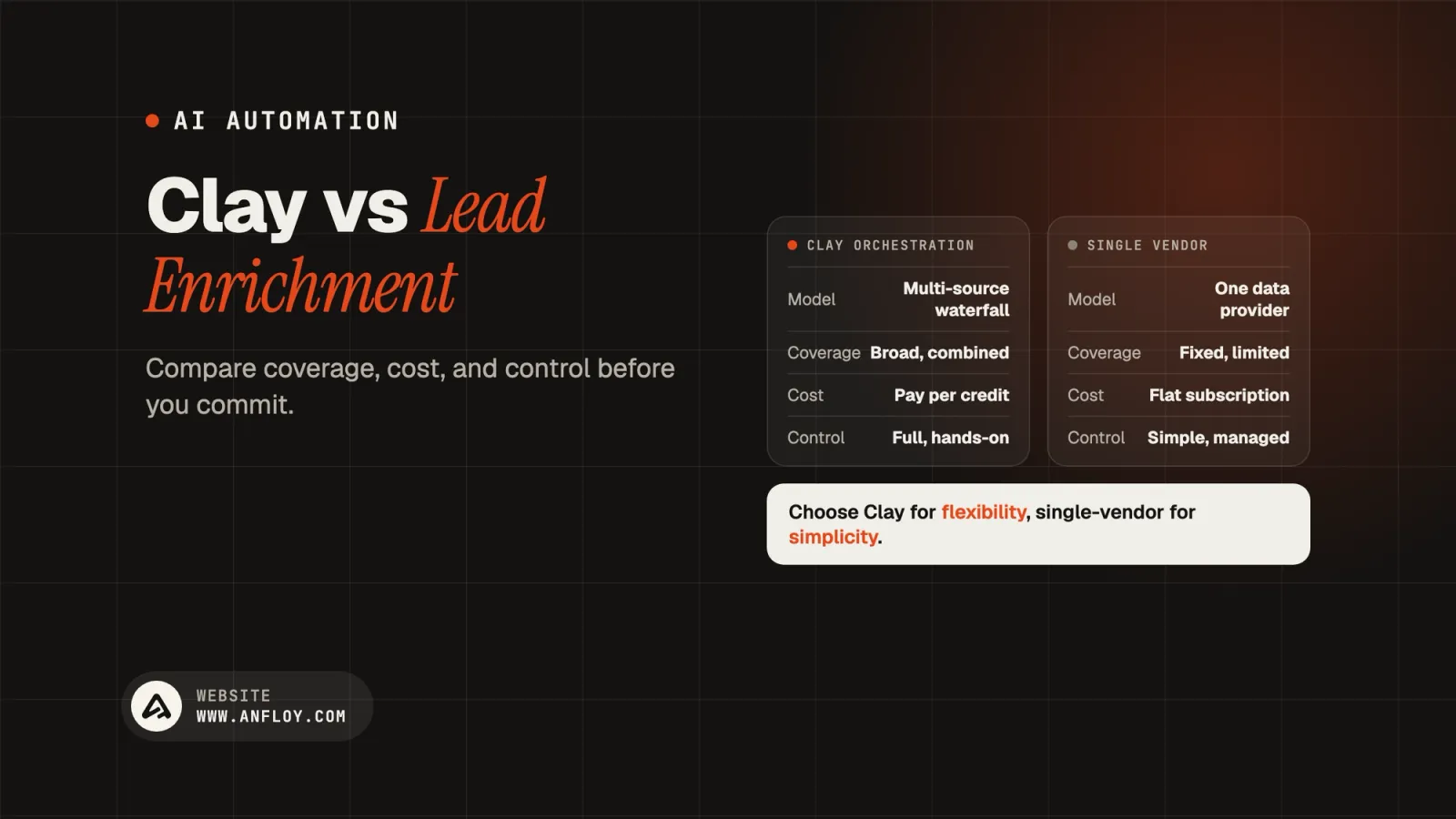
Clay's orchestration model and traditional single-vendor lead enrichment solve the same problem differently. Learn how they compare on coverage, cost, and control, and when each makes sense.
On this page
- What is traditional lead enrichment?
- What is Clay?
- What is the core architectural difference?
- Coverage and accuracy: Where the waterfall actually wins?
- Cost structure: A real comparison
- Control and customization: The real dividing line
- Where traditional enrichment still makes sense?
- Where Clay's orchestration model wins?
- Common mistakes when choosing between them
- How Anfloy helps teams get enrichment right?
- Conclusion
For most of the last decade, lead enrichment meant picking a vendor, ZoomInfo, Clearbit, Lusha, and living with whatever coverage and accuracy that single database happened to have for your market.
If the vendor's data on mid-market manufacturing companies was thin, your enrichment was thin. There was no second opinion built into the workflow.
Clay changed the default assumption. Instead of asking a team to pick one data provider and accept its coverage gaps, it treats enrichment as an orchestration problem: query multiple providers in sequence, keep the first good result, and let a workflow decide what happens next.
That's a meaningfully different architecture from traditional enrichment, not just a new interface on the same idea, and the difference shows up directly in coverage, cost structure, and how much control a team actually has over the process.
This guide compares the two approaches on the dimensions that matter, breaks down what Clay actually is versus what it isn't, and covers where each model fits depending on a team's stage and stack.
What is traditional lead enrichment?
Traditional lead enrichment is the single-vendor model: a company selects one data provider, typically a large database business like ZoomInfo or Clearbit, and pulls firmographic and contact data from that one source through an API, a CRM integration, or a browser extension.
The provider owns the database, maintains it, and sells access to it, usually priced per seat or per credit bundle.
The strength of this model is simplicity. One vendor, one contract, one data model to learn. The weakness is that coverage and accuracy are capped by whatever that single provider has managed to collect, and no database covers every company, role, and region equally well.
A provider strong on enterprise software companies in North America may be considerably weaker on mid-market manufacturers in Southeast Asia, and a team using only that provider has no way to fill the gap without adding a second, disconnected tool.
What is Clay?
Clay is a programmable enrichment and workflow orchestration platform, not a data provider in its own right.
Rather than maintaining a proprietary database, it connects to well over a hundred third-party data sources, Clearbit, People Data Labs, Apollo, Crunchbase, and dozens of smaller specialized providers, and lets a team build workflows that query several of them in a defined order for a given record.
The core mechanism is the waterfall: a workflow tries the first provider, and only pays for and moves to the second if the first returns nothing useful, continuing down the chain until a result is found or the options are exhausted.
Layered on top of that is Claygent, Clay's AI research agent, which can do open-ended lookups, like confirming a company's tech stack from its careers page or summarizing recent news about an account, that a structured database query can't answer at all.
What is the core architectural difference?
Everything else in this comparison flows from one structural choice: a traditional provider owns and sells access to its own database, while Clay owns none of the underlying data and instead orchestrates access to everyone else's.
| Dimension | Traditional Enrichment | Clay |
|---|---|---|
| Data ownership | Vendor owns a proprietary database | No proprietary database; orchestrates 100+ third-party sources |
| Coverage model | Capped by one provider's dataset | Waterfall across multiple providers, filling one provider's gaps with the next |
| Pricing structure | Per-seat or fixed credit bundle | Usage-based across Data Credits (buying data) and Actions (platform operations) |
| Customization | Fixed fields and workflow, set by the vendor | Fully programmable workflows, custom logic, conditional branching |
| Setup effort | Low, mostly configuration | Higher, workflows need to be built and maintained |
| AI-native research | Typically absent or bolted on | Native via Claygent for open-ended, unstructured lookups |
| Best fit | Teams wanting a simple, predictable single source | Teams wanting maximum coverage and willing to own the workflow logic |
Coverage and accuracy: Where the waterfall actually wins?
The waterfall model's advantage is straightforward statistically: if any single provider has, say, a 60 percent match rate on a given segment, and a second, independent provider has a similarly imperfect but different 60 percent, querying both in sequence produces meaningfully higher combined coverage than either alone, because their gaps rarely overlap perfectly.
Independent testing comparing Clay's multi-provider waterfall against a single-provider baseline on the same contact list has generally found the waterfall approach reaching noticeably higher match rates, though the exact gap varies by how many providers are stacked and how well-covered the target segment already is with any single source.
The tradeoff is that a waterfall queries providers in sequence until it finds a result, and a meaningful share of those queries return nothing at all, particularly on stale or lower-quality input lists.
Because most enrichment platforms, Clay included, charge for the attempt regardless of outcome, an unfiltered list can quietly burn through a real portion of a monthly budget on failed lookups before a single usable record comes back.
This is the same reasoning behind treating data enrichment as its own evaluated layer in a GTM stack rather than a checkbox feature bundled into a CRM.
Cost structure: A real comparison
Traditional enrichment pricing is comparatively easy to forecast: a fixed number of seats or credits at a known monthly rate, and the ceiling is the ceiling.
Clay's model is usage-based and split into two separate meters, Data Credits for buying enrichment data from its marketplace, and Actions for platform operations like running workflows, calling Claygent, and pushing records to a CRM.
That split, introduced in a March 2026 pricing overhaul, made Clay meaningfully cheaper for teams buying most of their data through its native marketplace, since marketplace data costs dropped substantially in that update, but it introduced a new cost for teams who bring their own provider API keys, since platform Actions are now billed separately where that usage was previously bundled in.
The subscription price on Clay's pricing page is also rarely the full cost of running it well. Most of Clay's most effective LinkedIn-based enrichment workflows perform meaningfully better with an active LinkedIn Sales Navigator subscription layered on top, and Clay itself doesn't send outreach, so a separate email sequencing tool is typically still required to actually act on the enriched data.
A team evaluating Clay purely against a traditional provider's list price without accounting for these adjacent costs is comparing an incomplete number to a complete one, the same miscalculation covered more broadly in AI automation cost.
Control and customization: The real dividing line
This is where the two models diverge most for a GTM engineer specifically. A traditional provider gives a team a fixed set of fields and a fixed enrichment logic; customization is limited to which fields to pull and where to push them.
Clay gives a team a programmable canvas: conditional branching based on a record's industry or size, custom scoring logic applied mid-workflow, calls out to other tools and APIs, and AI research steps for questions no structured database can answer.
That flexibility is also the cost. A traditional provider's workflow is close to zero-maintenance once configured.
A Clay workflow needs someone who understands the underlying logic well enough to build it correctly and revisit it when a provider's API changes or a workflow starts producing unexpected results.
This is the same tradeoff covered in Clay versus fully custom AI agents: Clay sits meaningfully closer to the custom end of the spectrum than a traditional single-vendor tool does, without requiring a team to build orchestration infrastructure entirely from scratch.
Want to know what a waterfall workflow would actually look like against your ICP? Get a free AI infrastructure audit and we'll map the coverage gap.
Where traditional enrichment still makes sense?
A single-vendor provider remains the right call when a team wants predictable, fixed pricing with no workflow to build or maintain, when the provider's coverage on the team's specific market segment is already strong, or when there's no internal capacity to own and iterate on enrichment logic.
For a small team running a straightforward, single-vertical motion, the simplicity of one vendor and one bill is a real advantage, not a limitation to work around.
Where Clay's orchestration model wins?
Clay tends to be the better fit once a team's target market spans segments no single provider covers well, once enrichment needs to feed conditional logic (different fields or scoring depending on company size, industry, or signal type), or once a team is building toward signal-based prospecting that requires combining enrichment with live triggers rather than static firmographic lookups alone.
It's also the stronger foundation for teams building AI-powered lead qualification or CRM automation on top of enriched data, since the workflow logic and the enrichment can live in the same programmable layer rather than being stitched together across disconnected tools after the fact.
Common mistakes when choosing between them
Comparing list prices without the adjacent costs.
Clay's subscription tier is only part of the real spend once Sales Navigator, a sequencing tool, and CRM integration costs are factored in. A traditional provider's all-in seat price is easier to compare fairly on its face.
Running an unfiltered list through a Clay waterfall.
Feeding a stale or low-quality contact list into a multi-provider waterfall without pre-filtering can consume a meaningful share of a monthly credit allocation on queries that return nothing at all.
Underestimating the maintenance a Clay workflow needs.
A workflow built once and never revisited will quietly degrade as underlying provider APIs change.
Someone needs to own it the way they'd own any other piece of GTM infrastructure, a discipline covered in more depth in Clay implementation for GTM functions.
Assuming more providers in a waterfall always means better data.
Stacking additional providers increases coverage but also increases the number of paid attempts and the chance of conflicting data between sources needing resolution logic.
More isn't automatically better past a certain point of diminishing returns for a given segment.
Treating Clay as a replacement for outbound execution.
Clay enriches and orchestrates; it doesn't send email, warm up a mailbox, or manage deliverability.
Teams that expect it to function as a full outbound platform end up needing a second tool regardless.
How Anfloy helps teams get enrichment right?
Anfloy builds enrichment architecture, whether that means a well-designed Clay waterfall, a traditional single-provider setup, or a fully custom pipeline, based on where a team's coverage gaps actually are rather than defaulting to whichever tool is trending.
This is the same discipline behind our broader work on AI solutions for GTM enrichment and company intelligence: the enrichment layer only earns its cost if it's feeding a workflow that actually acts on the data, not sitting as a clean CRM field nobody uses.
When a Clay-based or custom orchestration approach is the right call, we build the workflow logic, the provider sequencing, and the connection back into your CRM and outbound tools as infrastructure you own, not a workflow that breaks the moment the person who built it moves on.
Not sure whether Clay, a single vendor, or something custom fits your stack? See how our process works before committing to a build.
Conclusion
Clay and traditional lead enrichment aren't different flavors of the same tool, they're different architectural bets on how enrichment should work. A single-vendor provider bets on simplicity and a fixed, predictable cost.
Clay bets on coverage and flexibility, at the cost of needing someone to actually own the workflow logic behind it.
Neither bet is universally right. The teams making the better decision aren't the ones chasing whichever tool has the most buzz, they're the ones who know where their coverage gaps actually are and whether they have the capacity to own a programmable workflow before choosing.
Ready to figure out what your enrichment stack actually needs? Book a call, no decks, no demos, just a working session on where your coverage gaps are.
Frequently Asked Questions
Is Clay a data provider or a data orchestration tool?
Orchestration. Clay doesn't maintain its own proprietary database of companies and contacts; it connects to over a hundred third-party providers and lets a team build workflows that query several of them in sequence, keeping the best available result rather than relying on any single source.
Is Clay more accurate than a traditional provider like ZoomInfo or Clearbit?
Accuracy depends heavily on the segment and how the waterfall is built, but the underlying logic favors Clay for coverage: combining multiple independent data sources tends to catch records that any single provider would miss, since different providers' gaps rarely overlap perfectly. A traditional provider can still outperform a poorly built Clay workflow on a segment where that specific provider already has strong native coverage.
Does Clay replace the need for a CRM or outbound tool?
No. Clay handles enrichment and workflow orchestration; it doesn't send outreach, manage mailbox deliverability, or serve as a system of record. Most teams run Clay alongside a CRM and a separate sequencing tool, with Clay feeding clean, enriched data into both.
Is Clay worth it for a small team?
It depends on whether the team has the capacity to build and maintain workflows. Clay's free and lower tiers make it accessible to test, but getting real value out of it requires someone comfortable building and iterating on orchestration logic, not just someone who wants a simple, plug-and-play database.
How does Clay's pricing actually work?
Since a March 2026 pricing change, Clay bills through two separate meters: Data Credits for purchasing enrichment data from its marketplace, and Actions for platform operations like running workflows, AI research calls, and CRM pushes. Marketplace data costs dropped substantially in that update, which benefits teams buying most of their data natively through Clay, while teams bringing their own provider API keys now pay for platform Actions where that usage was previously included at no separate cost.
Let's build
what your
company needs.
Drop your email. We'll send The Custom Agent Blueprint on what we'd build first for a company like yours, before you ever take a meeting.